2.3 Insights
Exercise 2.3: Reviewing Campaign Performance Insights
Duration: 5 minutes
Understanding Insights and the Optimization Loop
GenStudio Insights brings performance data from connected paid media channels (Meta, LinkedIn, TikTok, and others) directly into the same application where content is created. This closes the optimization loop: performance marketers see how their content is performing and can immediately generate new variants informed by those insights. The Attributes view is particularly powerful; it surfaces which visual elements, messaging tones, and creative approaches drive the highest engagement, enabling data-informed generation in the next creative cycle.
Value for Your Organization:
- Performance data lives alongside the creation workflow, eliminating tool-switching and data silos
- Attribute analysis identifies which creative characteristics drive performance
- Insights directly inform the next generation cycle, creating a learning loop
- Connected channels include Meta, LinkedIn, TikTok, DV360, and Innovid
Step-by-Step Instructions
Step 1: Navigate to Insights
- Click "Insights" in the left navigation of GenStudio for Performance Marketing
- The dashboard opens to the Campaigns view by default
- Important: Change Filter to "Last 6 Months"
Step 2: Review campaign and ad performance
- Locate the "Awareness_Fall_Prestige_SplurgeEscapists_US_ExtendedStay_CMPID-B82K4Q" campaign and review summary metrics
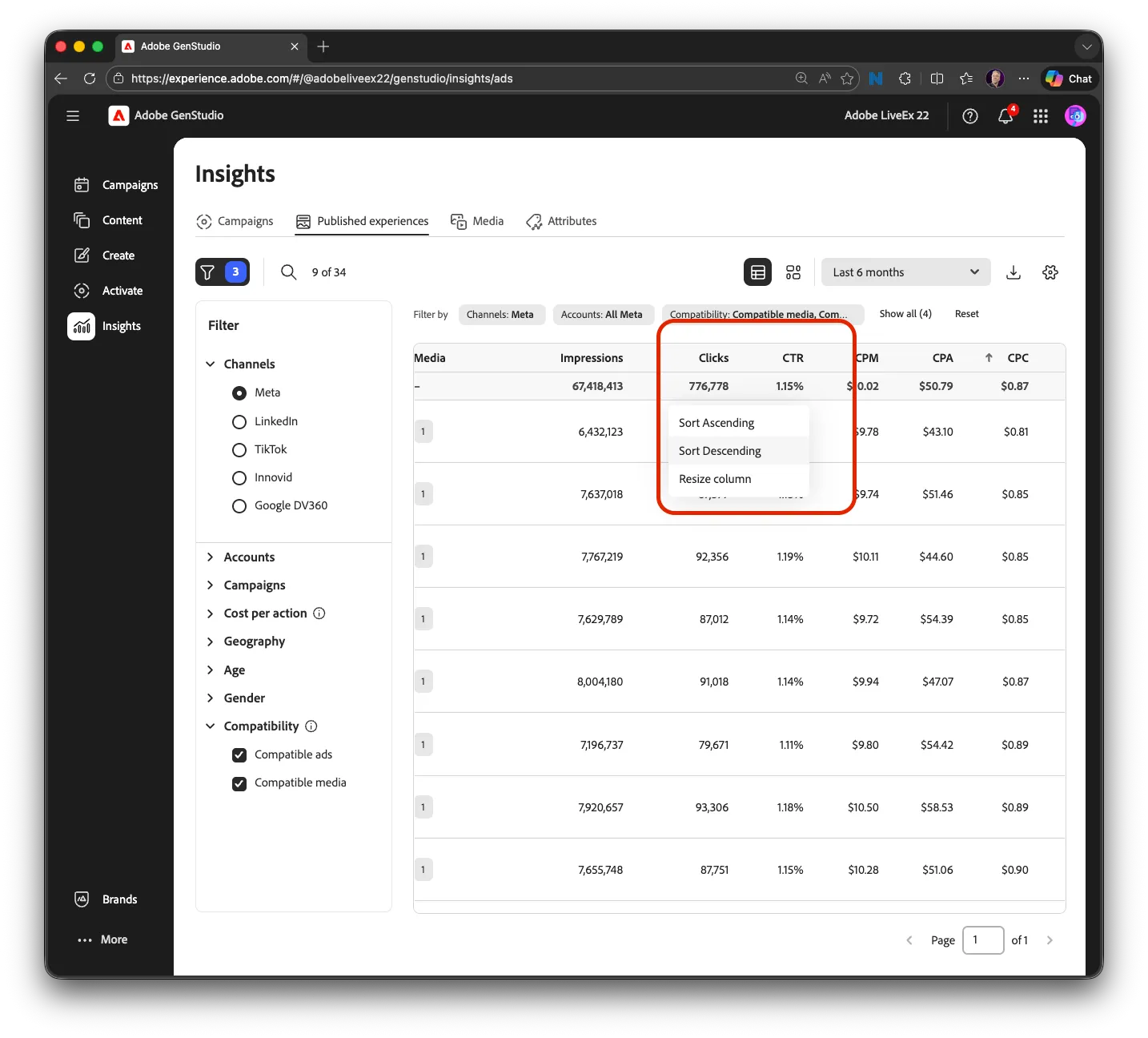
- Click into the campaign to see individual ad performance in the "Published Experiences" tab
- Identify which ad variants are driving the highest CTR and lowest CPC
Step 3: Explore the Attributes view
- Navigate to the Attributes tab
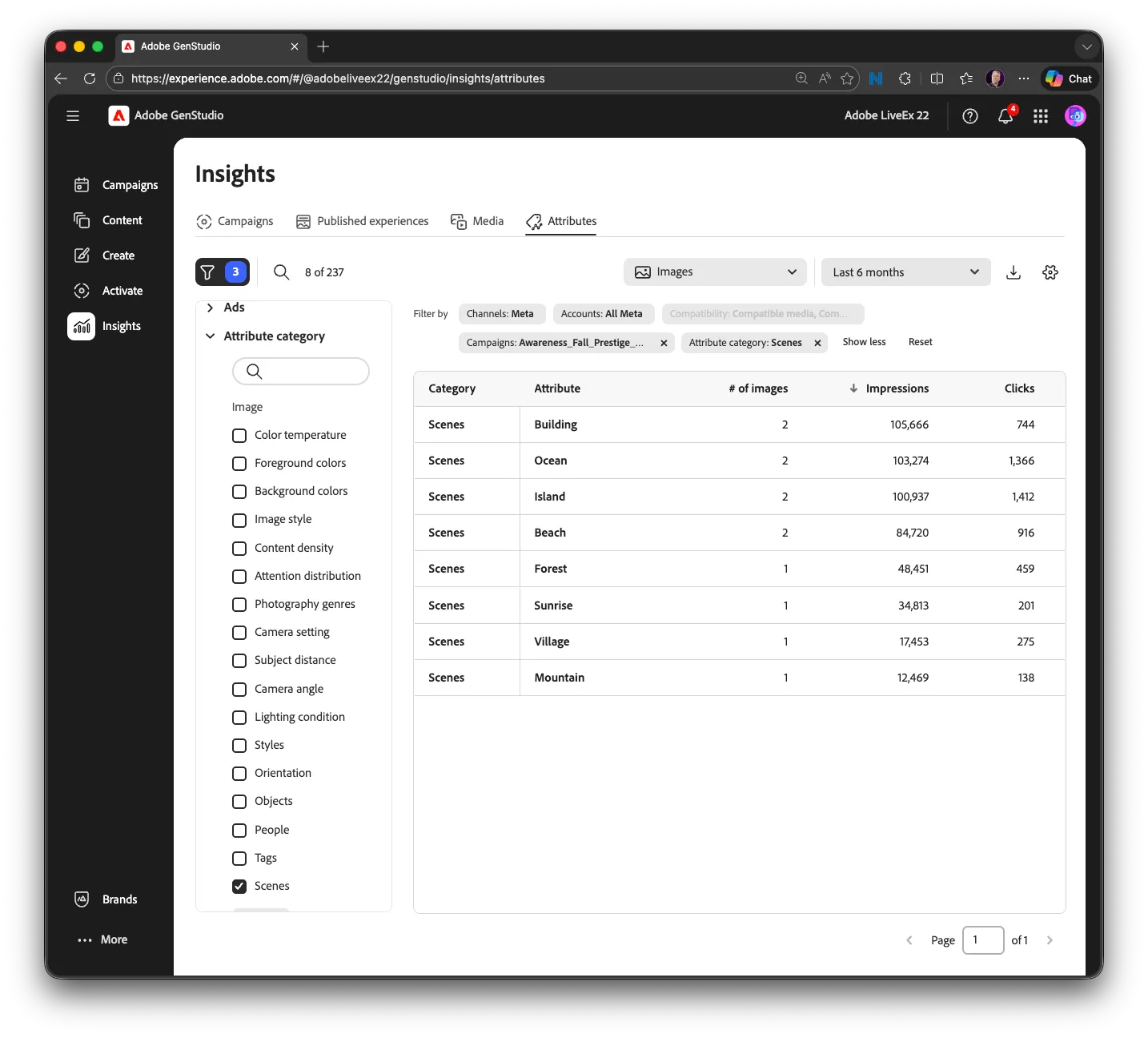
- Review which creative characteristics (tones, messaging styles, visual elements, CTA approaches) correlate with the strongest performance
- Filter to "Attribute Category" and choose "Scenes." Note which Attributes are high performing.
-
Step 4: Connect insights to your next generation cycle
- Based on attribute and ad performance data, identify specific changes for your next generation prompt
- For example: if warm-toned lifestyle imagery with question-based headlines shows the highest CTR, emphasize those characteristics in your next prompt
- This is the feedback loop that makes each generation cycle better than the last
Checkpoint
✓ Can you navigate the Insights views and identify which creative attributes correlate with the strongest performance metrics?
Use Case Example: A global financial services company uses GenStudio Insights to analyze Meta ad performance across 15 regional campaigns. The Attributes view reveals that ads with testimonial-style headlines and warm, personal imagery generate 2.8x higher CTR than corporate stock photography. The team updates their generation prompts accordingly, resulting in a 35% CTR improvement in the next campaign cycle.