Working with Compositions : in-Platform Walkthrough
In this section we will use the data points from SecurFinancial's Snowflake table to build an audience that:
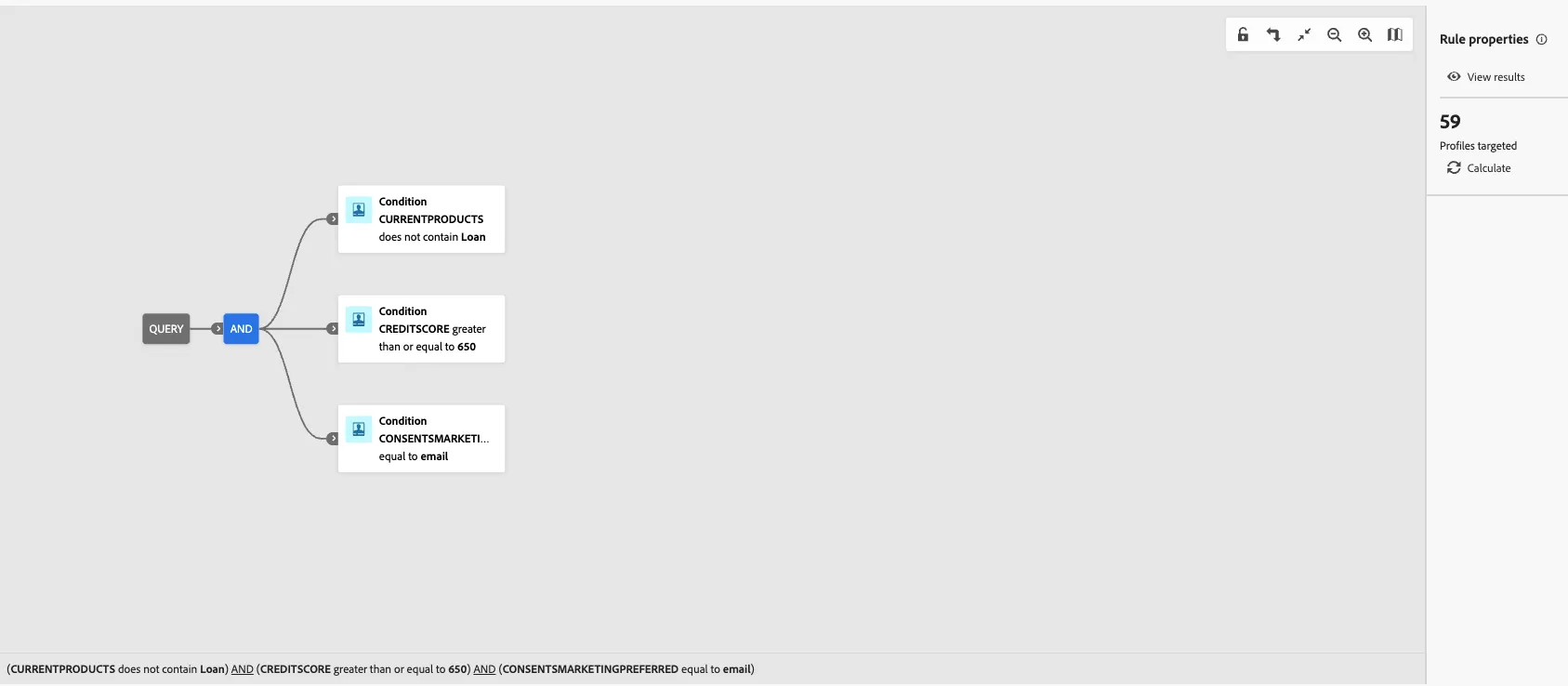
- Do not currently have a loan with SecurFinancial
- Have good credit (> 650)
- Who have opted in to receive marketing emails
Building a Federated Audience
- In the Customer > Audiences portal, click the Federated compositions tab.
2. Click Create composition.

3. Label your composition SecurFinancial Customers - No Loans, Good Credit + your lab user ID. Click Create.
4. Click the + button in the canvas and select Build audience. The right-hand rail should appear.
5. Click Select a schema and select the FSI_CRM schema then click Confirm
6. Click Continue. In the query builder window, click the + button and then Custom Condition. Create the following condition
We'll use marketing preference data to segment customers who have opted for email as their preferred channel of communication
Note: the value field is case-sensitive
Your query should now look as follows
7. Click the next + button then click Save audience.
Label this step SecurFinancial Customers - No Loans, Good Credit + your lab user ID. Use the same value as the audience label.
Add the following audience mappings:
8. Click Save and then click Start, to run the query of the composition you just built.
Note: We used the Product and Credit information to build our Audience and didn't move sensitive data( eg; credit score) to downstream platforms for activation.