Campaign Activities
3 min
Orchestrated campaign activities in Adobe Journey Optimizer empower you to design seamless, data-driven marketing journeys that connect with your audience at the right time and through the right channels. By combining targeting, channel, and flow control activities, you can define precise audience segments, personalize messages, and automate complex workflows. Whether you’re building audiences, synchronizing campaign branches, or adding delays for perfect timing, these activities work together to streamline your campaign execution. With tools like Enrichment for data enhancement or Split for audience segmentation, you’ll have a flexible toolkit to create meaningful, impactful customer experiences. More information about Activities.
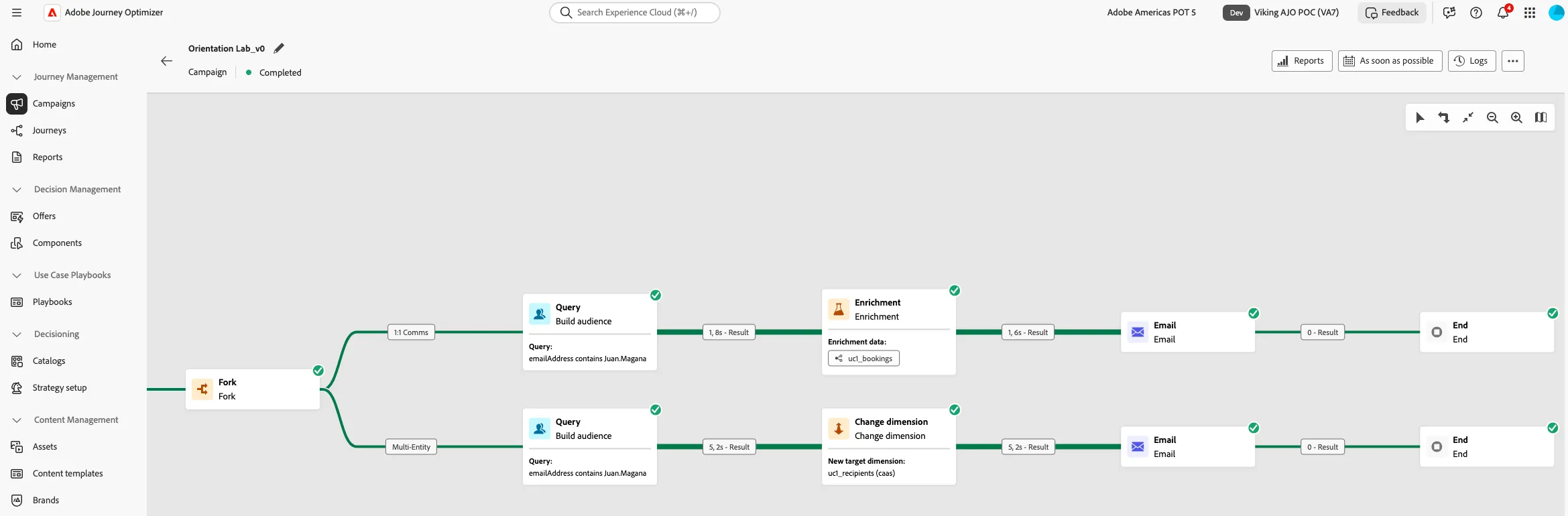
Add Fork
- Click on the plus sign and select Fork so we have 2 transitions
- Add a Build Audience Node to each Transition path
- On the first query, click the folder icon next to Targeting Dimension, select uc1_recipients. Do not select your table. Select the one without a number.
- Click Create an audience. Add a Condition.
- Search for the emailAddress field and select it.
- Set the emailAddress contains Sarah.Williams
- Confirm
- On the second query, repeat step 3 thru 7, but this time around the Targeting Dimension will be uc1_bookings. Do not select your table. Select the one without a number.
Add Enrichment
- On the top transition path, click the plus sign next to its query, and select the Enrichment Node.
- Click add enrichment data.
- Click Targeting dimension, and select uc1_bookings > ProductName
- Click Add Attribute, and select uc1_bookings > fromPort
Add Change Dimension
- On the bottom transition path, click the plus sign next to its query, and select the Change Dimension.
- Select uc1_recipients.
Add Channel Activities (Email)
- Add an email to the end on both Transition Paths.