Website logo
Getting Started
Access
Demo Website
Customer Profiles
Lab Slides
Real-time CDP
Unified Profile
Activation
Audiences
Journey Optimizer
Create a journey
Customer Journey Analytics
Introduction
Attribution
Journey Analysis
Audience Publishing
Conclusion
Docs powered by Archbee
Getting Started

Access

2 min
  1. Go to Adobe Experience Platform 
  2. When prompted for authentication, use the following Adobe ID. Do not use your own email address. Also, sign-out from all Adobe instances that might be open.

Password for all users is: hktw@2024

User #

Login Email

1

[email protected]

2

[email protected]

3

[email protected]

4

[email protected]

5

[email protected]

6

[email protected]

7

[email protected]

8

[email protected]

9

[email protected]

10

[email protected]

11

[email protected]

12

[email protected]

13

[email protected]

14

[email protected]

15

[email protected]

16

[email protected]

17

[email protected]

18

[email protected]

19

[email protected]

20

[email protected]

21

[email protected]

22

[email protected]

23

[email protected]

24

[email protected]

25

[email protected]

26

[email protected]

27

[email protected]

28

[email protected]

29

[email protected]

30

[email protected]

31

[email protected]

32

[email protected]

33

[email protected]

34

[email protected]

35

[email protected]

36

[email protected]

37

[email protected]

38

[email protected]

39

[email protected]

40

[email protected]

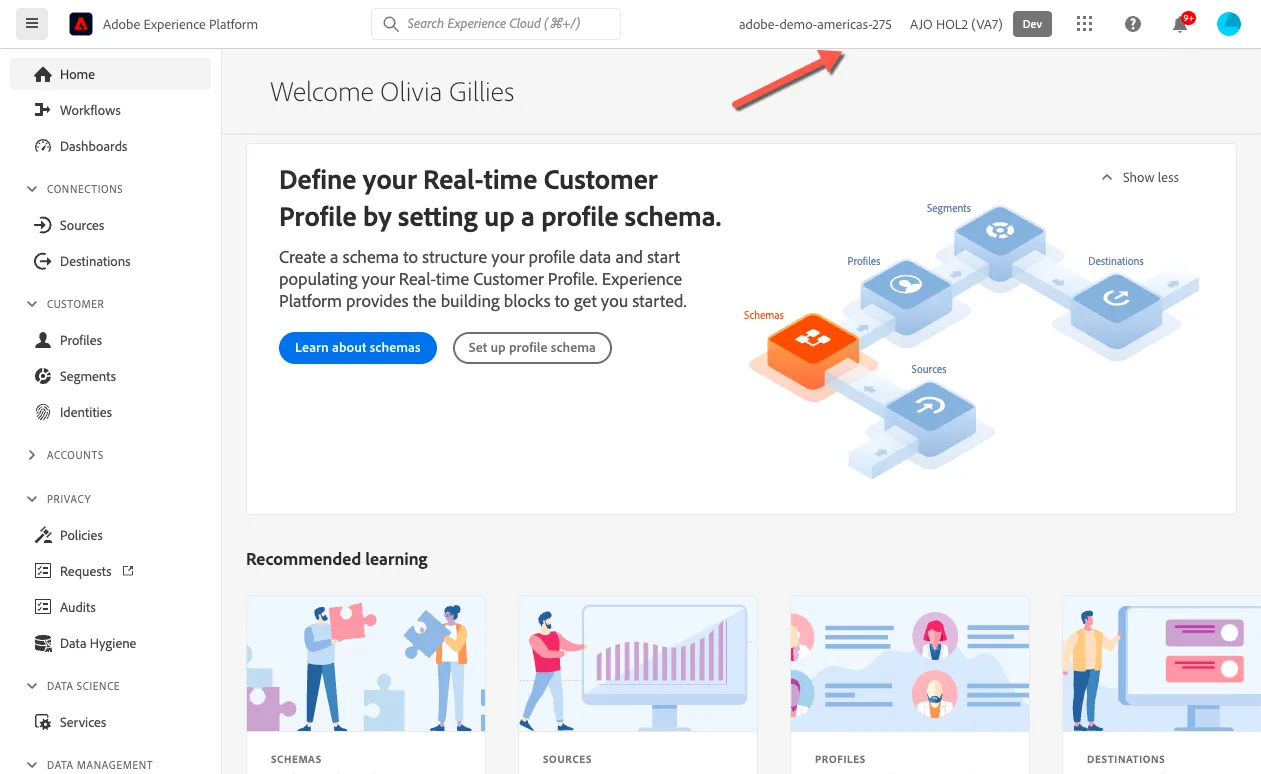
Ensure you are in the right sandbox. On the top right you should see...

  1. Adobe-demo-americas-275, indicating the organisation.
  2. AJO HOL2, indicating the sandbox
Document image

Updated 30 Jan 2024
PREVIOUS
Getting Started
NEXT
Demo Website
Docs powered by Archbee