Understand Model Performance
6 min
Model insights
Model insights provides key insights and learnings from the model to guide strategy and optimization. There are five tabs that we will walk through throughout the exercises below.
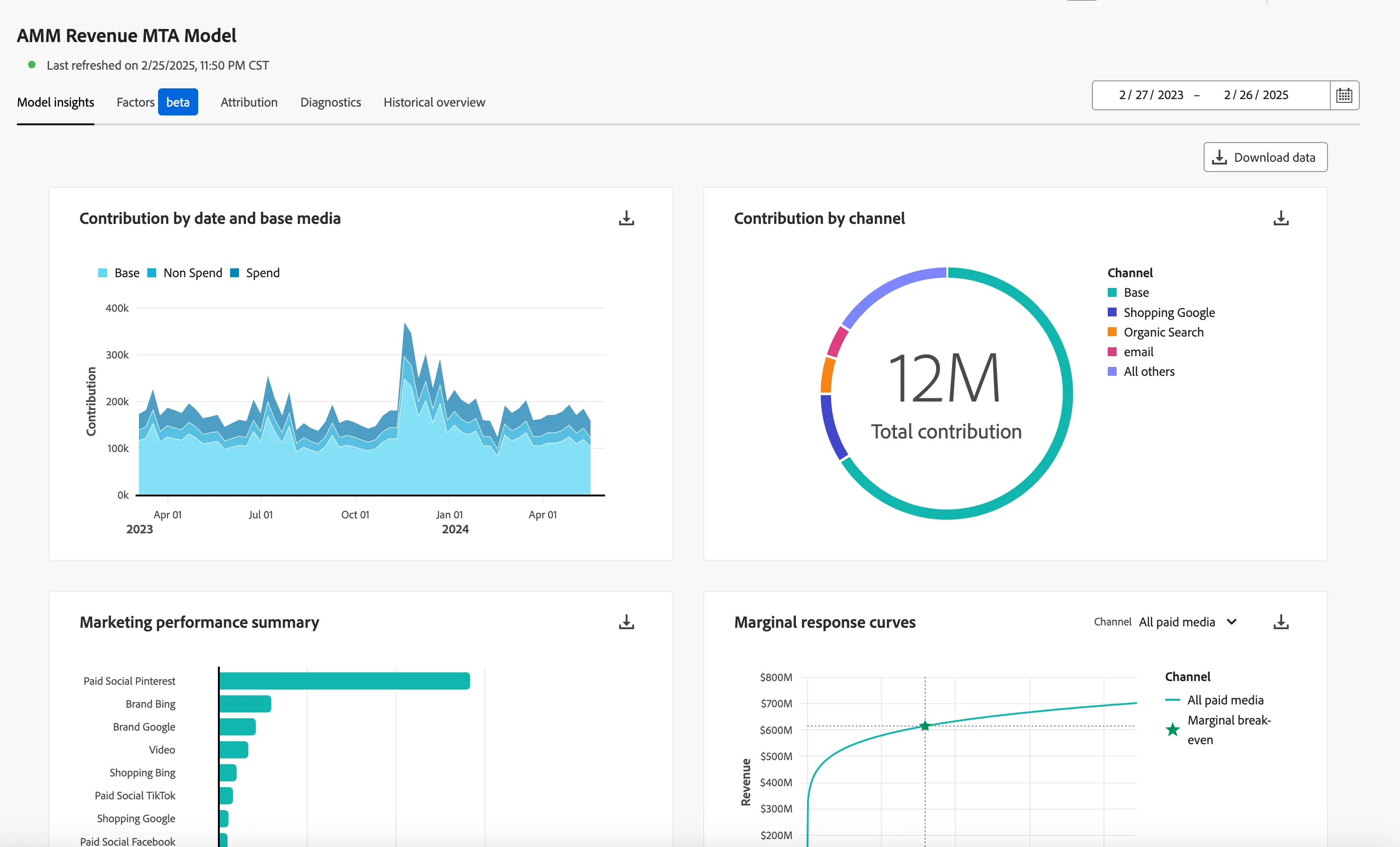
- Model Insights. This will show you key MTA-informed MMM insights from the model.
- Contribution by date and base media – a visual that shows the incremental lift over your base from your spend and non-spend channels. The baseline is calculated in the model, and this represents what the model determines to be the baseline of activity that was going to happen anyway, without marketing. This is crucial is being able to understand incrementality, which allows us to answer the question - how impactful is my marketing at changing behavior, at getting someone to take this action?
- Contribution by channel - This chart splits out spend and non-spend into the specific channels, showing how many conversions, the numeric value, each channel and the base are getting credit for the conversions.
- Marketing Performance Summary - This shows each channels ROI percentage, or CPA - depending on how the model was configured.
- Marginal Response Curve - Sometimes referred to as saturation curves, this visual shows at what point does it NOT make sense to keep spending in a specific channel. The planning tools take this information into account when forecasting where to advise spend in future campaigns, based on the point of diminishing returns. Recently released: Dynamic Marginal Return curves, meaning that changing the date range above (overall model insights) will change the curve which gets re-calculated for that specific date range.
- Touchpoint Breakdown - A touchpoint level breakdown of incrementality metrics for all or selected channels on a weekly basis that can be exported to a BI visualization tool of your choosing.
Factors
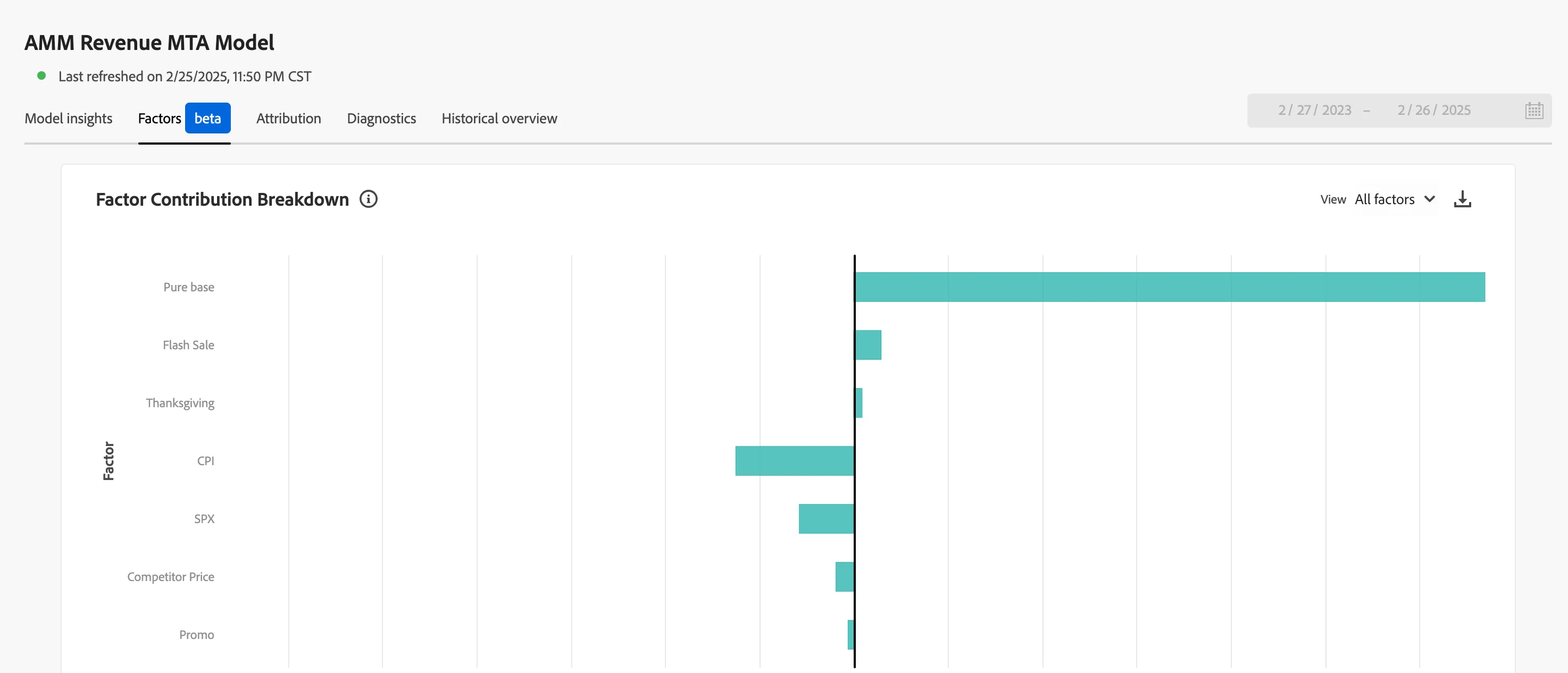
- Factors - Understand the incremental effect, positive or negative, of the various internal and external factors have on marketing performance, such as economic conditions or promotional activities. Any factors included in model configuration will appear here, but you have the option to down-select on factors you want to hone in on.
Attribution
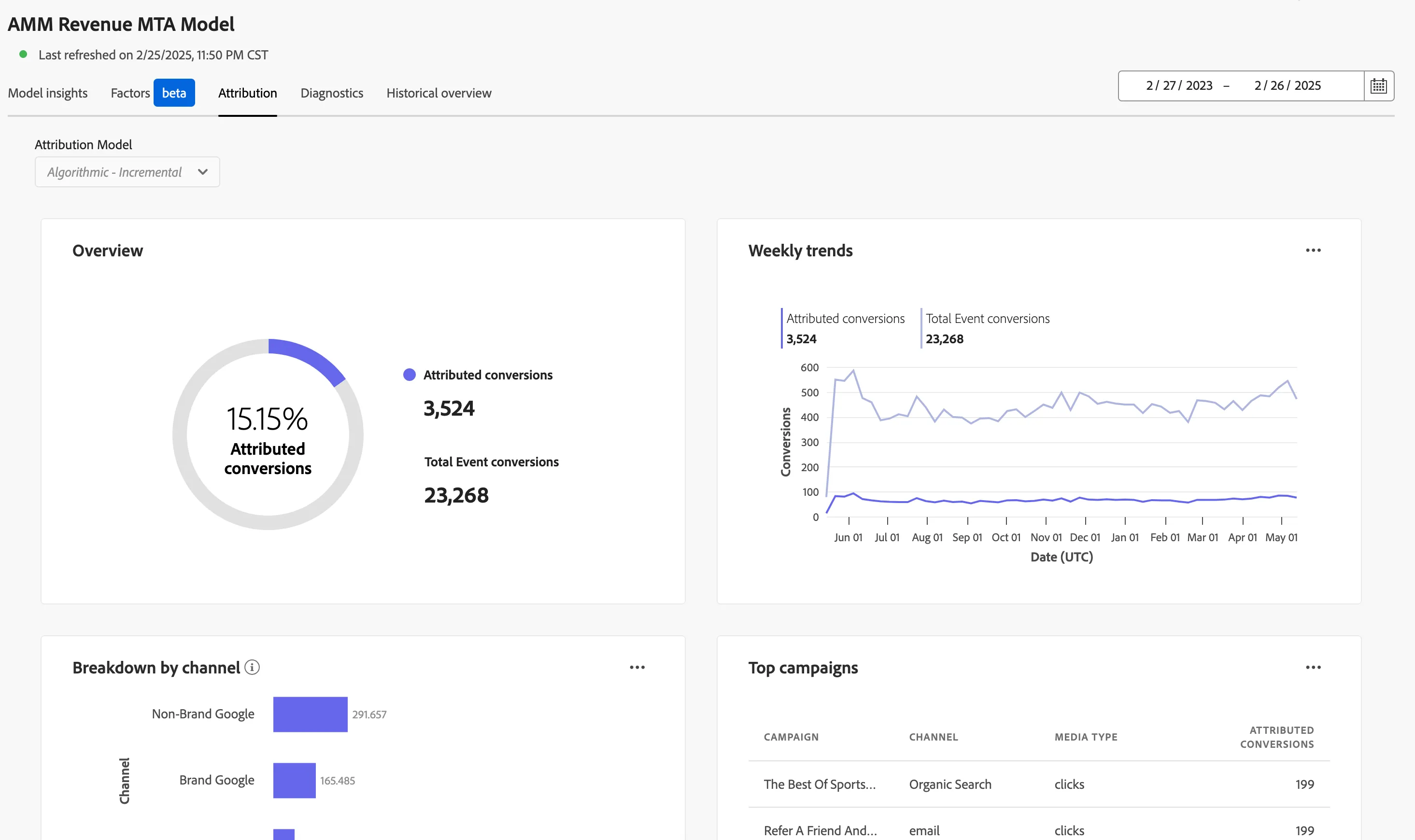
- Attribution – If a model is configured with event level data (the MTA toggle was turned on during the model configuration exercise), you can see additional attribution insights here. The MTA insights on this tab are informed by MMM due to our bidirectional transfer learning technology, making insights consistent across both tabs. You can look at the attribution conversions from an Incremental and Influence algorithmic attribution, or some common rules based models. The visuals seen here are:
- Overview - Of the total event conversions observed, this number and percentage is what the model is attributing to marketing channels included in the model
- Weekly Trends - This output is a summary across all channels that have event level data included in this model, and the time range is used to change this model.
- Breakdown by Channel - Of the event-level conversions we’re tracking, this is the incremental amount per channel vs. the total conversions observed per channel.
- Top Campaigns - We can get this detail because of the event-level data we have in the tool, if this was decorated with campaign ID, this will show up here so a customer can understand across their channels, what are the top campaigns driving incremental value.
- Breakdown by Touchpoint Position - This helps a user better understand for each channel or touchpoint, what is the best position in the customer journey, whether it’s more impactful at the start, middle, or end of the customer’s journey across marketing touchpoints.
- Top Conversion Paths – This visual helps you understand what the ideal flow of a customer journey across marketing channels could be based on where the most ROI is coming from.
Diagnostics
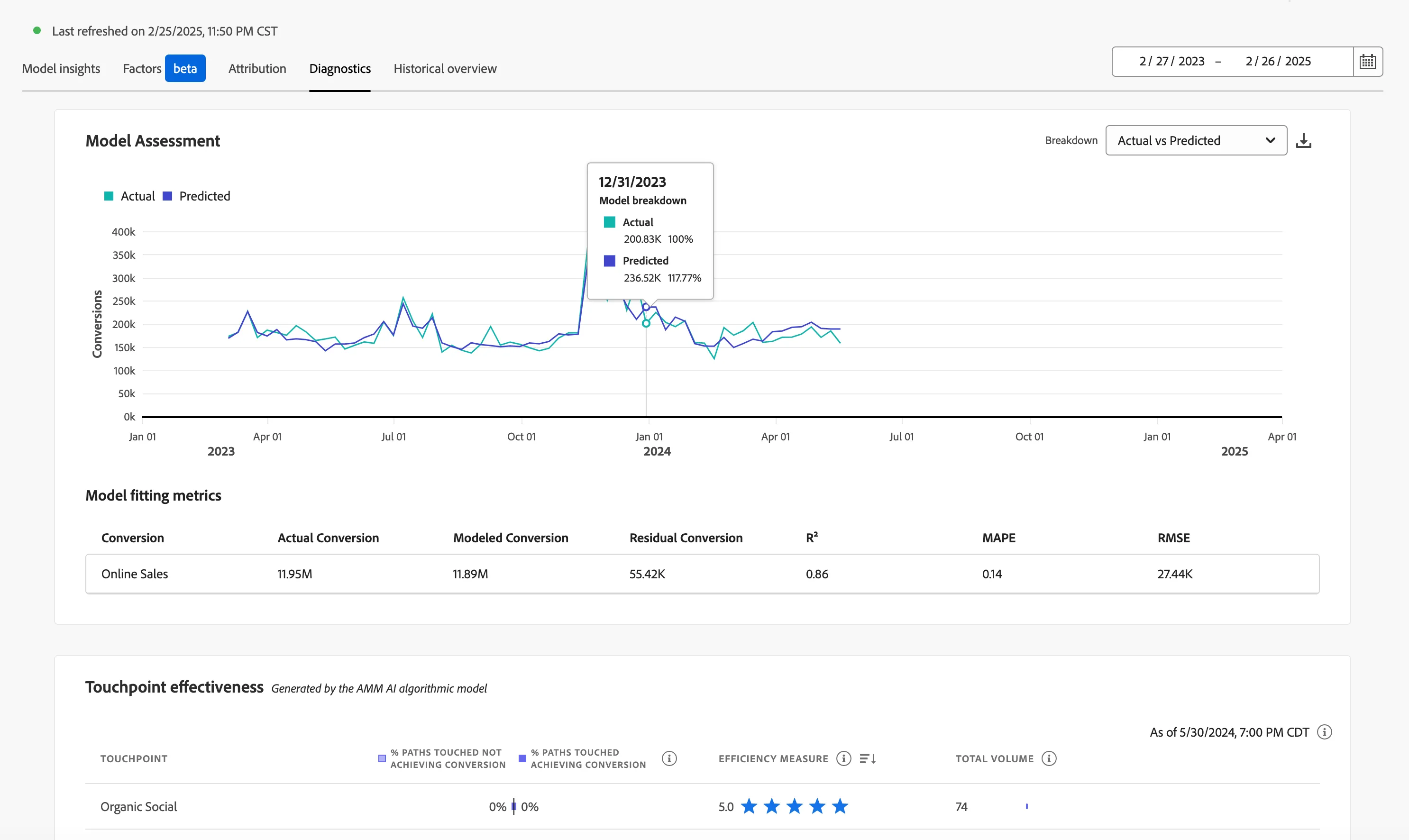
- Diagnostics – In this tab you’ll have transparency into the model diagnostics, using industry standard model diagnostics.
- Model Assessment - This shows the actual vs. predicted/modeled, or residual (difference between actual and modeled) conversions and like other time series charts hovering over this will show daily distribution of these metrics over time.
- Model Fit Metrics
- R2 (R-squared), which tells how well the data fits the regression model (the goodness of fit).
- MAPE (Mean Absolute Percentage Error), which is one of the most used KPIs to measure forecast accuracy and expresses the forecast error as a percentage of the actual value.
- RMSE (Root Mean Square Error): which shows the average “error”, weighted according to the square of the error.
- Touchpoint Effectiveness - This view is less about telling a user to action, and is more a diagnostic tool to understand why the model output is saying what it is.
Historical Overview
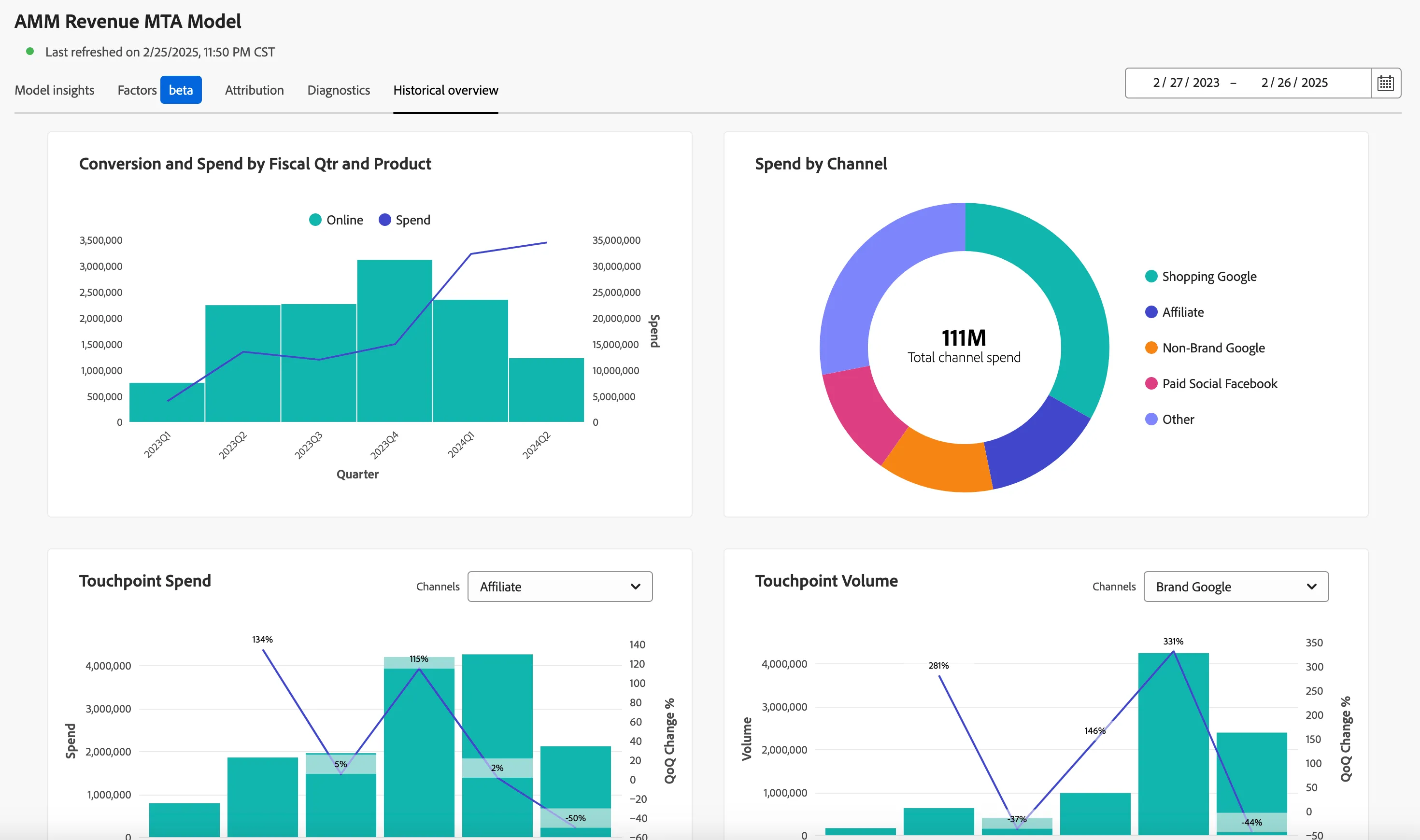
- Historical Overview – A look at historical information to make ensure that the user is seeing what the expect.
- Conversion and Spend by Fiscal Quarter and Product.
- Spend by Channel.
- Touchpoint Spend
- Touchpoint Volume