Evolution from Adobe Analytics
As organizations strive to create unified, real-time views of their customers, many are transitioning from Adobe Analytics (AA) to Customer Journey Analytics (CJA).
Familiar concepts like report suites, eVars, and segments still exist—but they behave differently. CJA introduces Connections, Data Views, and Schemas, offering more agility and precision in your analysis.
This hands-on exercise will guide you through the core steps to migrate an Adobe Analytics project into CJA, giving you a practical foundation for how to approach and scale your migration efforts, highlighting key differences and hands-on steps.
Preparing to Migrate
The recommended process of upgrading from Adobe Analytics to Customer Journey Analytics is a new implementation of the Experience Platform Web SDK, which is the preferred data collection method for Customer Journey Analytics. In conjunction with the Web SDK, Adobe also recommends using the Analytics source connector to help with your transition to Customer Journey Analytics. Use the Analytics source connector to retain historical Adobe Analytics data and to perform side-by-side data comparison.
After you have enough historical data using the Experience Platform Web SDK and you have fully transitioned to Customer Journey Analytics, the Analytics source connector can be turned off and the Web SDK can be used exclusively.
🔍 Explore Recommended upgrade steps
Depending on several factors, such as timeline and resource constraints, the recommended upgrade steps might not be practical for your organization. In this case, you can dynamically generate upgrade steps for your organization’s unique circumstances.
To dynamically generate upgrade steps for your organization’s unique circumstances:
- Navigate to Customer Journey Analytics.
- Select Upgrade to Customer Journey Analytics under Learning from the left hand menu.
- Follow the generated step-by-step instructions to see the recommended process for upgrading to Customer Journey Analytics.
The end result will give you the number of upgrade steps expected, and a "how to" guide for each:
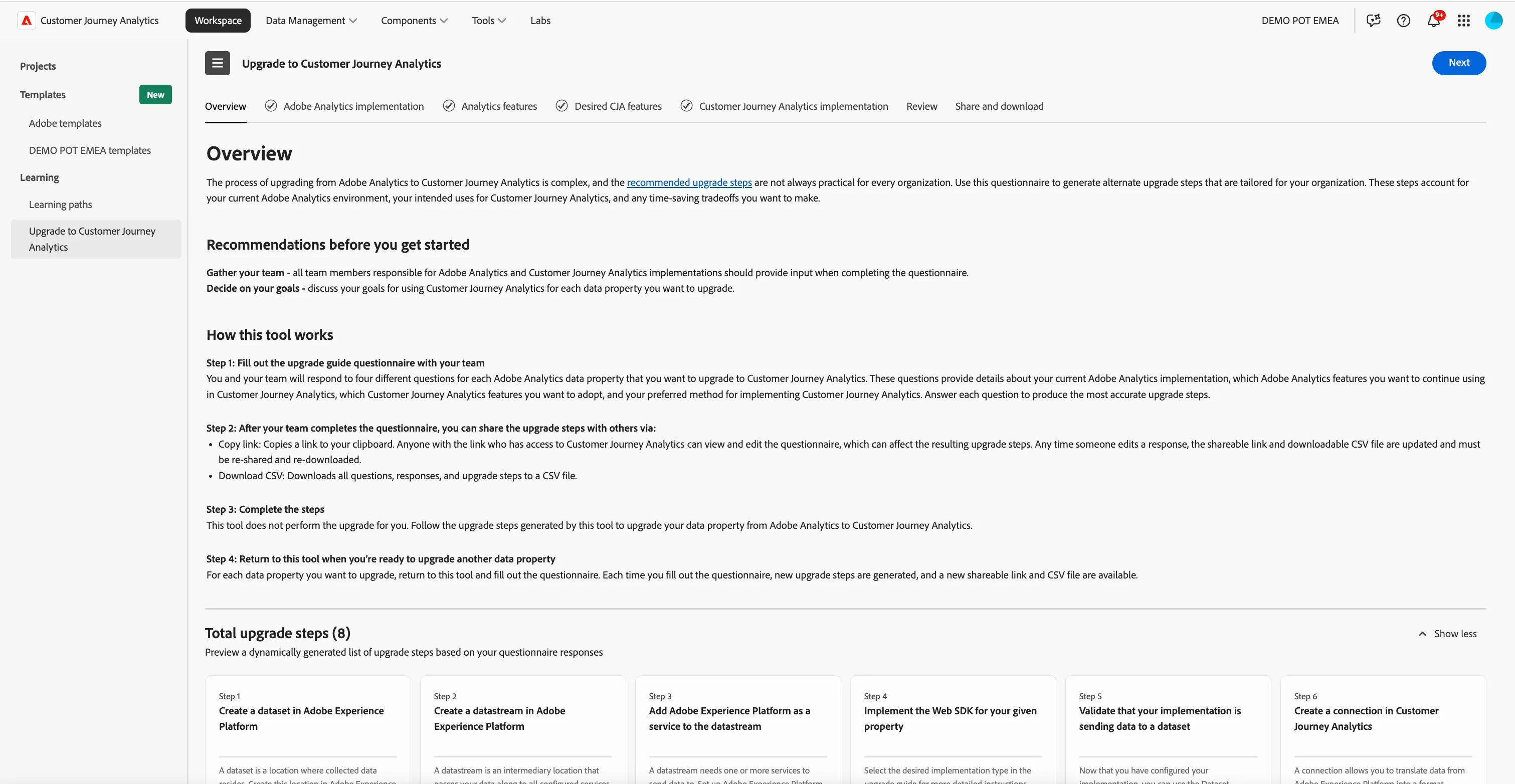
Overview of Migration Tooling availible
This exercise will help you:
- Perform a project migration from AA to CJA
- Map dimensions and metrics appropriately.
🧪 Exercise Steps
This exercise has been added for your information only. There is not need to complete the migration steps, only to understand how this tool could be used for your organisation.
1. Access the Component Migration Tool
- Navigate to the Adobe Analytics product using the top, right navigation.
- Navigate to Adobe > All Admin from the top, left navigation.
- Select Component Migration from Data configuration & collection.
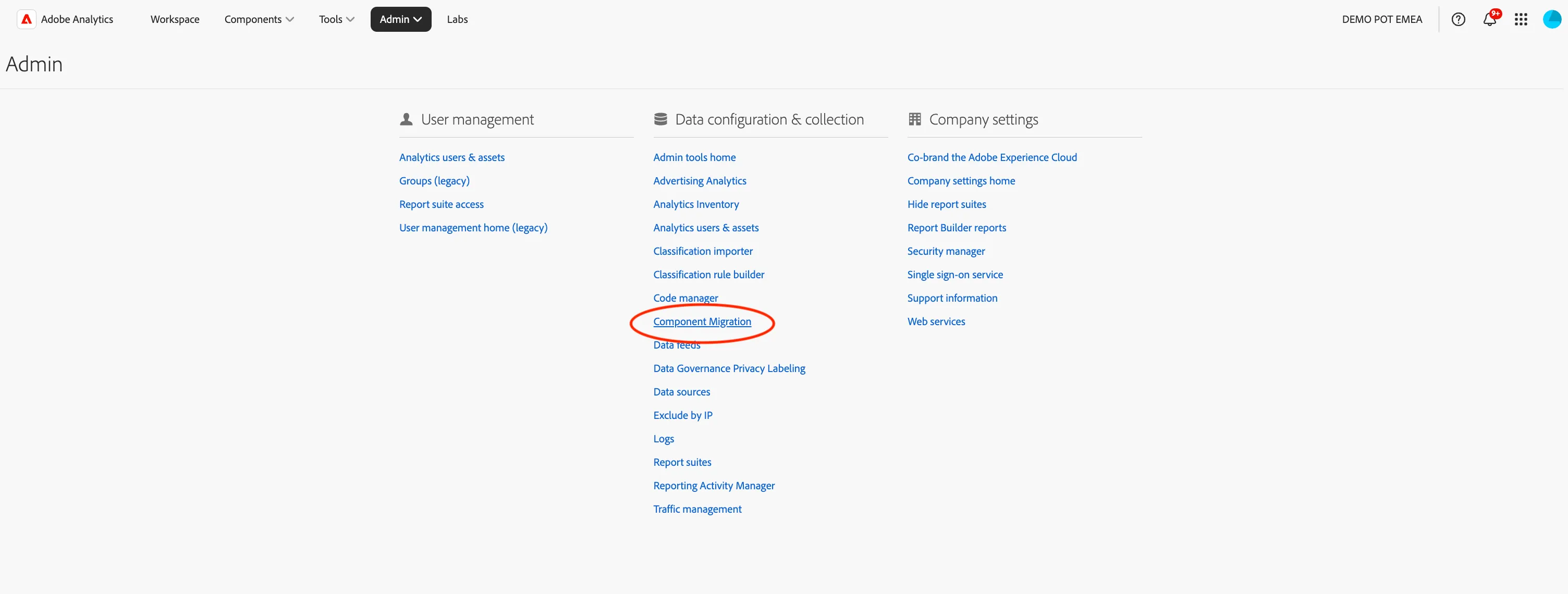
- Locate the project you wish to migrate. In our case Currys - Online KPIs
2. Initiate Migration
- Select the checkbox next tot the project and click on the Migrate to Customer Journey Analytics icon.
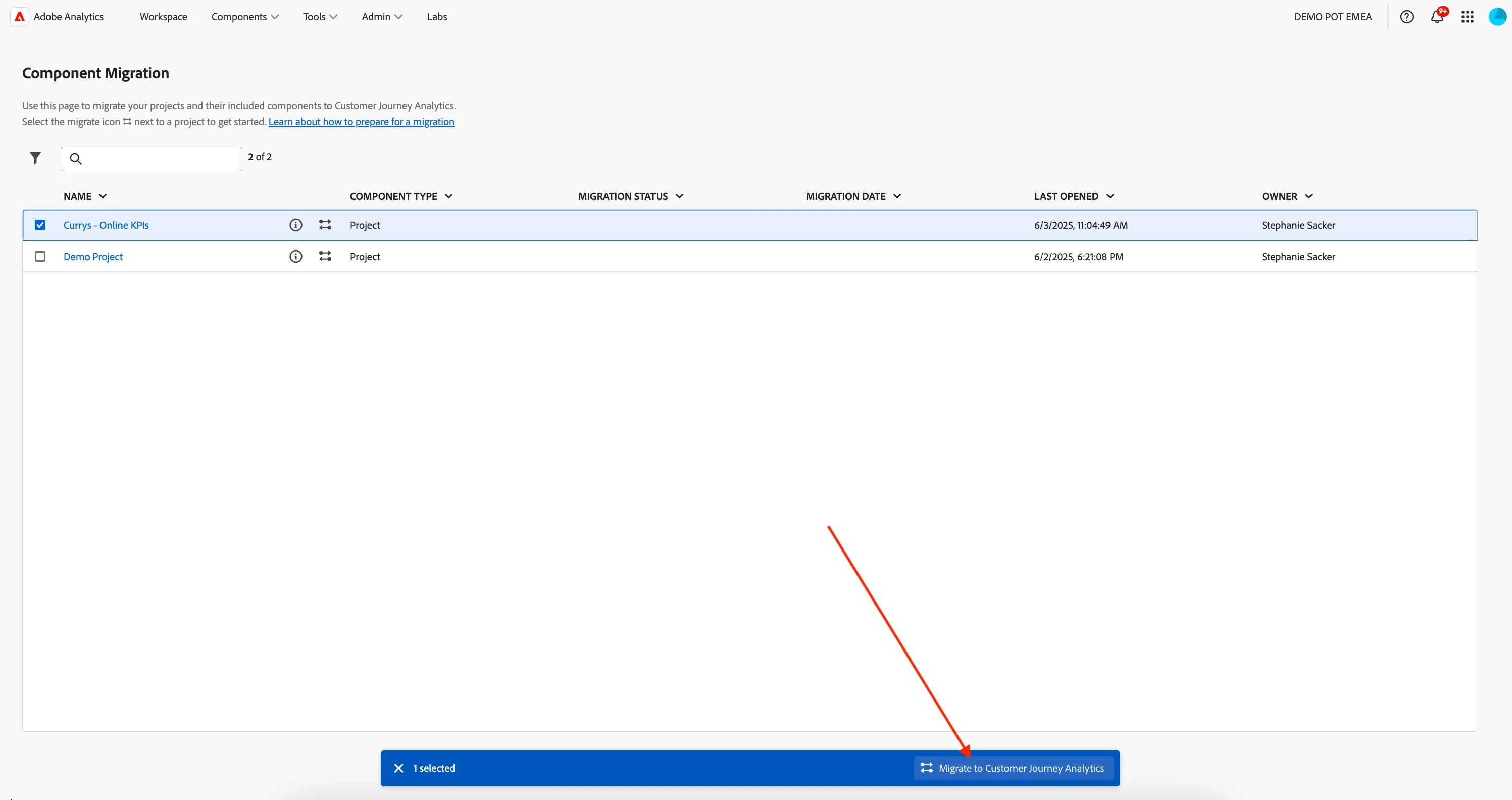
- In the migration window:
- Project Owner: assign a CJA administrator as the new owner, assign yourself.
- Click Global Website, under Map schema for report suites
- Data View: Select the Currys - Cross-channel Data view data view in from the drop down list.
3. Variable Mapping:
- Select Map Schema, In the Map Schema section:
- Automatically Mapped: Review dimensions and metrics that are auto-mapped.
- Manually Map: For unmapped items, manually select the corresponding dimension or metric in CJA.
Note: Once mappings are set, they apply to all future migrations and cannot be changed without contacting Customer Care.
➡️ DO NOT complete the migration in this Lab. ⬅️
- Expand the > Dimensions secion. We can see that the page name dimension in AA is Not mapped to a dimension in CJA.
- Click on the Page Name (prop1) dimension.
- Select Page Name from the "Map customer journey analytics dimension" drop down.
- The status will now have changed to Mapped.
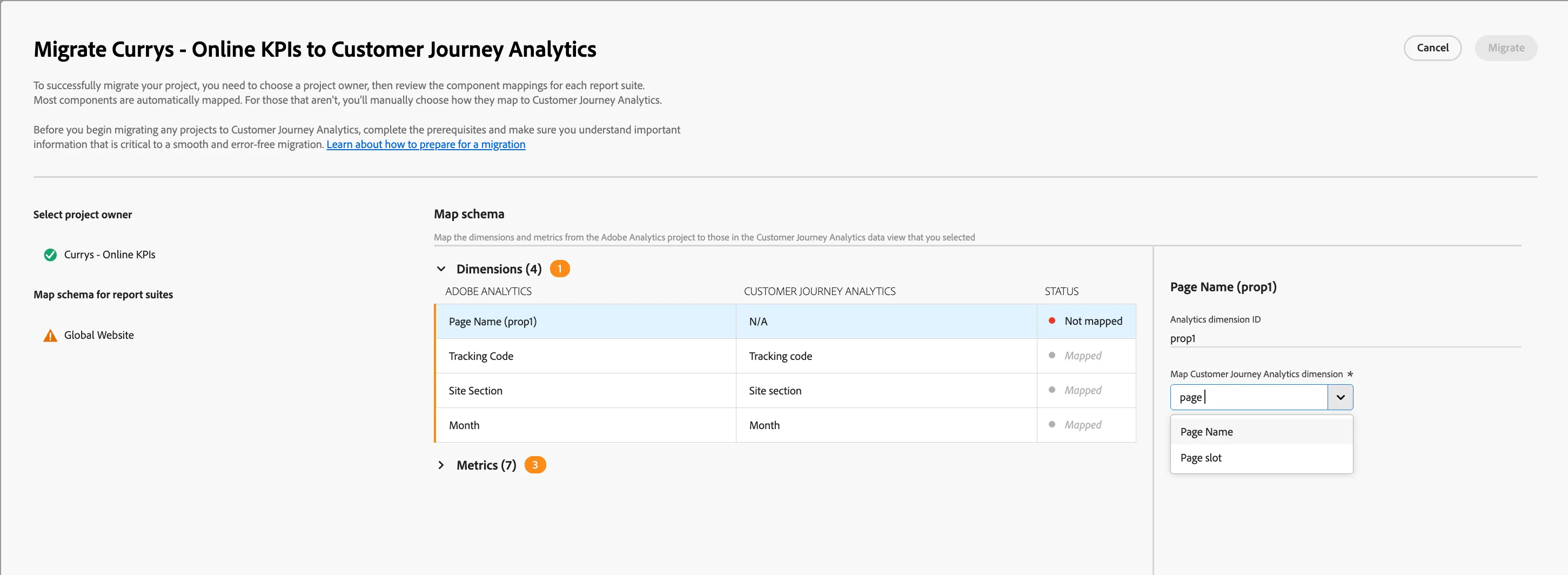
- Next, we need to map the Metrics. Expand the > Metrics section.
- We can see the page name instances, Registrations, and Page Views metrics are Not mapped. Let's map the Page View metric.
- Click on the Page View metric, and search Event: in the "Map customer journey analytics dimension" drop down.
- Select Event: Page Views. The status will now have changed to Mapped.
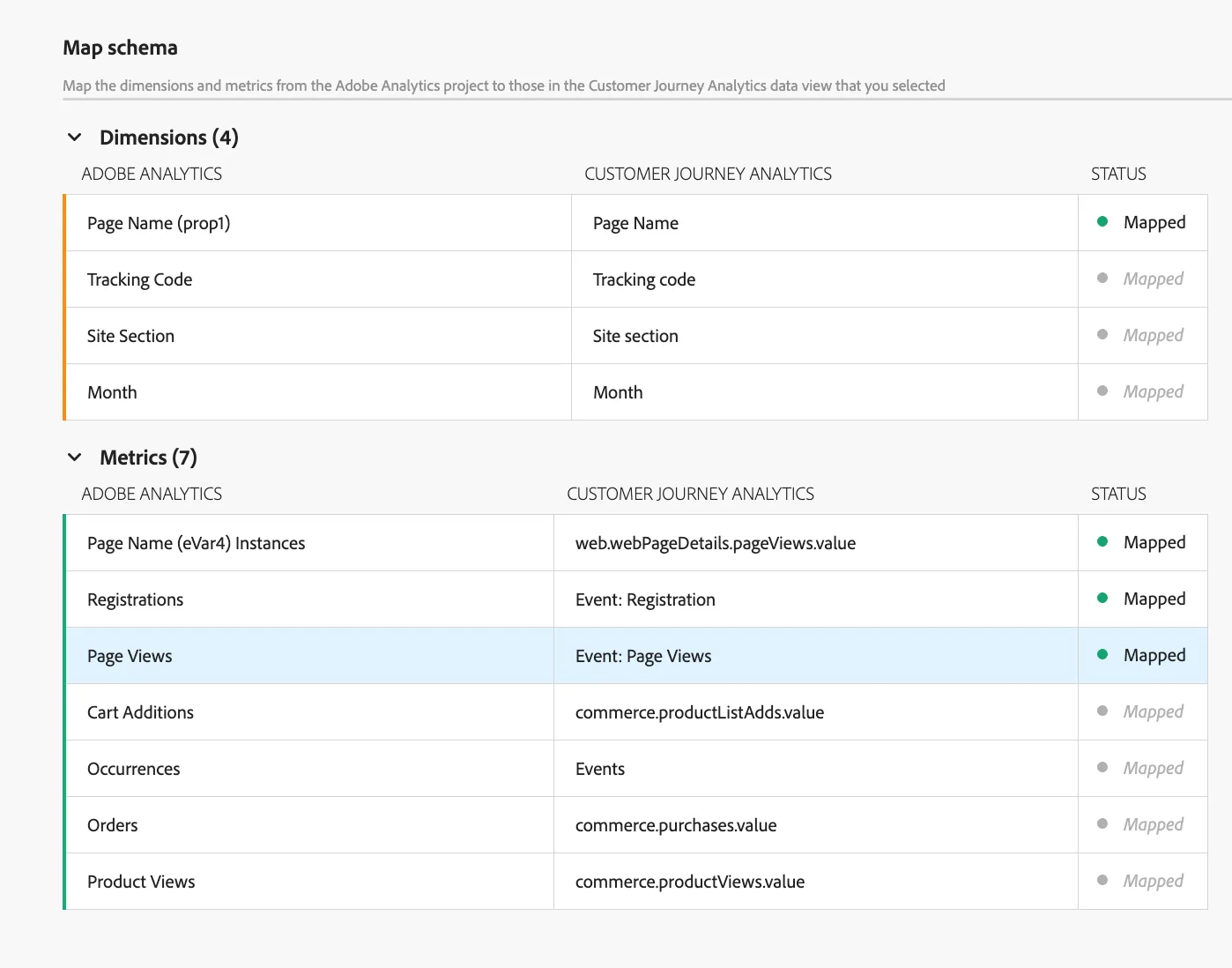
- Map the 2 remaining metrics as follows:
- Page Name (eVar4) instances to web.webPageDetails.pageViews.value
- Registrations to Event: Registration
- Your final mappings should look like:
4. Complete Migration
➡️ DO NOT complete this migration step in this Lab. ⬅️
- After mapping, click Migrate to initiate the process.
- Monitor the Migration Status for completion or any errors.
5. Post-Migration Verification
- In CJA, open the migrated project.
- Verify that:
- Panels and visualizations are intact.
- Segments are functioning correctly.
- Date ranges and calculated metrics are accurate.
🔄 Key Differences to Note
- Data Containers: AA uses Hit, Visit, and Visitor containers, whereas CJA uses Event, Session, and Person containers.
- Data Sources: CJA can integrate data from multiple sources, offering a more comprehensive view of the customer journey.
- Variable limits: No limits, as we are not limited by the number eVars, props, events in CJA.