Post Lab Resources
Feedback Survey

HOL Presentation
HOL Recording
Completed Workspace
Resources
Q&A
Identity, Stitching, and Customer Identification
Q: Are changes in Customer Journey Analytics retroactive?
A: Yes. Changes made in Data Views are retroactive and non-destructive. Historical data does not need to be re-ingested; changes are applied at report time and do not alter the underlying data stored in Adobe Experience Platform. Adobe Experience League Reference
Q: What is the difference between anonymous and known identifiers?
A: Anonymous identifiers include ECID, cookies, or device IDs prior to authentication. Known identifiers include email, CRM ID, or loyalty ID after login. Identity stitching connects these to enable person-level analysis.
Q: How is identity stitching in CJA different from Real-Time CDP stitching?
A: CJA stitching supports cross-channel analysis for reporting, while Real-Time CDP primarily uses stitching for activation. CJA supports field-based and graph-based stitching.
Q: Does CJA create a new customer ID?
A: No. Customer Journey Analytics does not generate new IDs; it uses existing identifiers already present in your datasets.
Data Views and Reporting
Q: Can one panel use multiple Data Views?
A: No. Each Analysis Workspace panel supports only one Data View, though multiple panels can be used side-by-side.
Q: Should transformations be done at ingestion or in Data Views?
A: Best practice is clean ingestion, but Data Views and Derived Fields allow non-destructive report-time transformations when upstream changes are not feasible.
Attribution and Marketing Measurement
Q: Why does revenue initially show as zero?
A: Revenue often occurs after marketing dimensions are set. Attribution models are required to associate downstream success events with upstream touchpoints.
Q: What attribution models are available?
A: CJA supports First Touch, Last Touch, Linear, Participation, Same Touch, and Algorithmic Attribution with configurable containers and lookback windows.
Experimentation Panel
Q: Can we calculate incremental lift between experiment variants?
A: The Experimentation Panel computes lift for each variant relative to the single control you specify. It does not automatically compute “Variant B vs Variant C” lift directly. Variant‑to‑variant comparisons require either re‑defining the control or building a calculated metric.
If you need lift of Variant B relative to Variant C (where neither is the designated control), you have two options:
- Re‑run the panel with a different control
- Set C as the control once, then B as the control, to get each one’s lift vs the other.
- This is simple but requires a couple of panel runs.
- Use calculated metrics with the Lift function
- The Experimentation feature exposes Lift as an advanced calculated metric function, where you can specify experiment, control variant, success metric, and normalizing metric
- You can define a calc metric that:
- Picks one variant as “control” for the purpose of the formula, or
- Derives a ratio between two non‑control variants’ conversion rates using standard calc‑metric arithmetic (since conversion rates per variant are available).
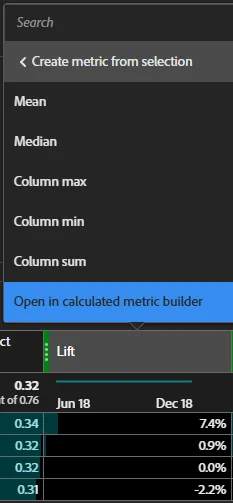
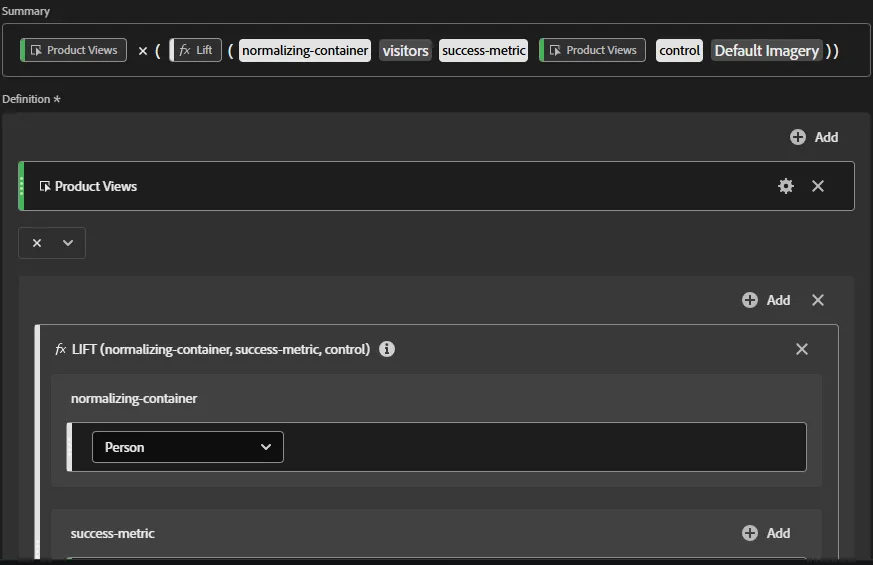
If you want to add a view of incremental counts (additional revenue $, additional application #, etc.) you can add a calculated metric from the Experimentation Panel. Create a metric from Lift that simply multiplies its value by your success event.
In this example, the success metric of Product Views applies to the current view of Lift, so we multiply the percentage of lift by the Product Views metric.
(Note: this method is specific to the produced Lift and Experimentation Panel setup, so a new calculated metric is required for each panel build).

AI Assistant and Guided Analysis
Q: What can the AI Assistant do?
A: The AI Assistant can answer product questions, troubleshoot issues, generate visualizations, and provide intelligent captions based on Experience League documentation.
Q: What is Guided Analysis?
A: Guided Analysis provides preconfigured workflows such as funnels, retention, and release impact for fast, self-service insights.
Audiences and Activation
Q: Can audiences be created from CJA analysis?
A: Yes. Audiences can be created directly from CJA tables, flows, and journeys and published to Adobe Experience Platform for activation.