Ex4: Style the Block
In this exercise, we'll decorate the block we created.
Step 1 — Create the JavaScript file
- Create blocks/quote-lab/quote-lab.js:
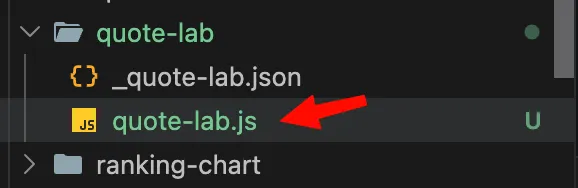
- Add:
export default function decorate(block) {
  const [quoteRow, authorRow] = block.children;

  const quoteText = quoteRow ? quoteRow.textContent.trim() : '';
  const author = authorRow ? authorRow.textContent.trim() : '';

  block.replaceChildren();

  const blockquote = document.createElement('blockquote');
  blockquote.textContent = quoteText;
  block.append(blockquote);

  if (author) {
    const cite = document.createElement('cite');
    cite.textContent = author;
    block.append(cite);
  }
}
What does this code do?
Universal Editor initially renders the block fields as rows. The decoration function transforms those rows into semantic HTML:
The code performs the following steps:
- Reads the first row as the quote.
- Reads the second row as the author.
- Removes the original row structure.
- Creates a semantic <blockquote> element.
- Creates a <cite> element when an author is present.
The implementation uses textContent, which keeps this introductory exercise simple and prevents author-entered HTML from being inserted directly into the page.
Note: This simplified implementation treats the quote as text. It does not preserve rich-text markup inside the quote. A production implementation may need to preserve approved rich-text elements if the block requires formatting such as links or bold text.
Step 2 — Add simple NatWest styling
- Create the css file: blocks/quote-lab/quote-lab.css
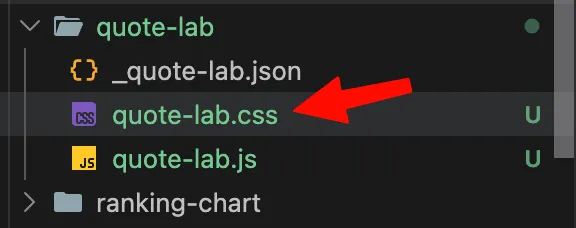
- Add:
.quote-lab {
  margin: 24px 0;
  padding: 24px;
  border-left: 4px solid var(--nw-purple-bright, var(--link-color));
  background-color: var(--nw-purple-tint, #f2eaf9);
}

.quote-lab blockquote {
  margin: 0 0 8px;
  color: var(--nw-purple, var(--dark-color));
  font-family: var(--heading-font-family);
  font-size: var(--heading-font-size-s, 1.25rem);
  font-style: italic;
  line-height: 1.4;
}

.quote-lab cite {
  display: block;
  color: var(--dark-color);
  font-size: var(--body-font-size-s, 0.875rem);
  font-style: normal;
  font-weight: 700;
}

.quote-lab cite::before {
  content: "— ";
}
Step 3 — View the styled block locally (optional)
If the AEM CLI is running:
- Save quote-lab.js.
- Save quote-lab.css.
- Return to http://localhost:3000.
- Refresh the page if it does not reload automatically.
- Confirm that the Quote Lab block is now styled.
If you are not using the AEM CLI:
- Commit and push the JavaScript and CSS files.
- Open the page through the project’s Preview or Universal Editor workflow.
- Refresh the page after the code becomes available.
Step 4 — Test the content behavior (optional)
- Verify the following cases:
- Confirm that both the quote and author are displayed:
- Use a longer quote and confirm that:
- The text wraps correctly.
- The block does not overflow horizontally.
- The spacing remains readable.
- Remove the author and confirm that:
- The quote remains visible.
- An empty author line is not displayed.
- The em dash is not displayed without an author.
- Add two Quote Lab blocks to the same page and confirm that:
- Each block displays its own content.
- One block does not affect another.
- The spacing between blocks is consistent.
- Check the block responsiveness at:
- Desktop width.
- Tablet width.
- Mobile width.
Step 5 — Commit and push the implementation
- Review the modified files with git status, verify that only those files are changed:
- Add the implementation files:
- Commit the changes:
- Push the branch:
Troubleshooting
Problem | Likely cause | Resolution |
|---|---|---|
Quote Lab does not appear in Universal Editor | The source JSON was not built or pushed | Run npm run build:json, commit the generated files, and push the branch |
Quote Lab is not available inside a section | The section filter was not updated | Add "quote-lab" to the components array in models/_section.json |
The existing quote block changed | Files in blocks/quote/ were edited accidentally | Restore those files and work only in blocks/quote-lab/ |
Universal Editor shows the block but fields are missing | Model field names or IDs do not match | Confirm the model ID is quote-lab and the field names are quote and author |
The block appears without styling | The CSS file name or folder name is incorrect | Confirm the path is blocks/quote-lab/quote-lab.css |
The JavaScript does not run | The JavaScript file name or export is incorrect | Confirm the file is blocks/quote-lab/quote-lab.js and uses a default exported decorate function |
The local page returns 404 | The content is not available in Preview or the project mapping is incorrect | Publish the page to Preview and verify fstab.yaml, paths.json, and the page path |
Changes do not appear locally | The CLI is not running or the browser is serving cached content | Confirm aem up is running and refresh the browser |
The root JSON files look different after the build | They are generated files | Do not edit them manually; review the generated diff and commit it with the source files |
The author is not displayed | The author field is empty or the second row is not present | Check the Universal Editor content and confirm the model contains the author field |
Key takeaways
This exercise shows the full custom-block lifecycle in AEM: define and register the block, decorate it into semantic HTML, style it with theme-aware CSS, then test and ship it through Git.