Profile Lookup and Real-time Stitching
3 min
Exploring an existing profile in Adobe Experience Platform
- Navigate to Profiles from the left-hand navigation bar.
- Click on the Browse tab.
- Search for 'Email' under namespaces.
- Enter the email address provided by the instructor as Identity Value.
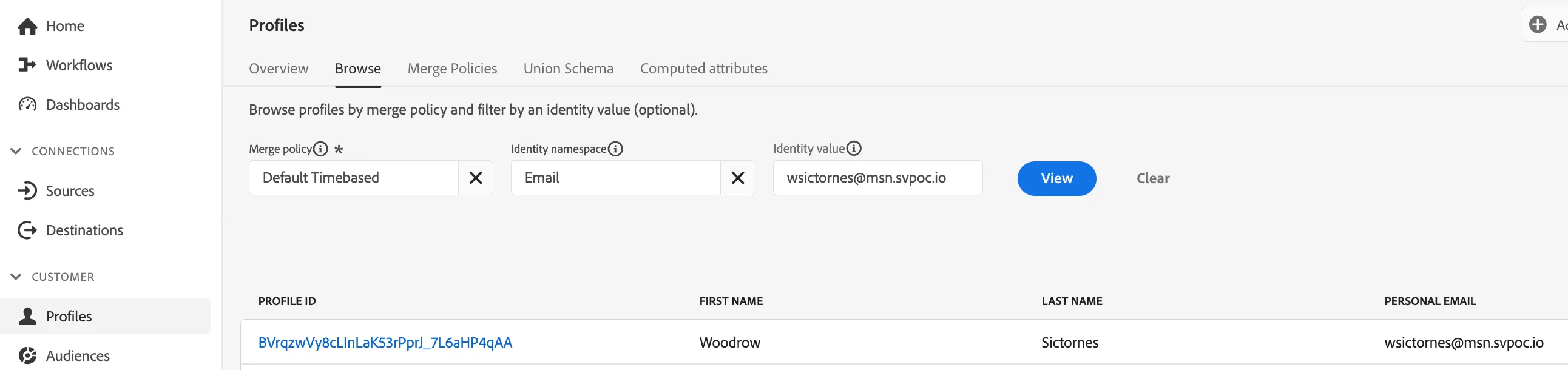
Profile Look Up
5. Click View
6. Now click on the Profile Id to exlore the profile tied of the demo customer
7. Review the profile for
- Basic Attributes
- Retail Profile Attributes
8. This dashboard provides all the information that has been onboarded for your customer Birk, including
- CRM attributes
- Events and Interactions
- Audience Memberships
Profile Stitching - Web to CRM via onsite authentication
- View an unknown or anonymous visitor profile using the instructor's ECID vaue
- Follow the instructor as they log-in to a demo site using the email address value above resulting in a real-time profile stitch of their pseudonymous online profile and with the known CRM profile.