[Bonus] Exploring the Segmentation Service API
In this exercise, you’ll use Postman and Adobe I/O to create an audience, by making use of Adobe Experience Platform’s APIs.
At the moment, in the scope of Real Time Customer Profile, the terms segment and audience are interchangeable. Audience is the new name of what Adobe used call segment. The Product Management is working to update all the materials with the new term, but some elements in docs and APIs still have use "segment".
Create an audience
Creating an audience using the AEP API's require a number of steps in Postman. But first...
- Locate the AEP Bootcamp collection.
- Open the Segmentation Service API folder.
Create a segment definition
We will first create a segment definition.
- Select POST Create a new segment definition.
- Click on the Body tab to see the body of the request.
You see the segment expression defined in the Profile Query Language, PQL. You can find more information and documentation about PQL.
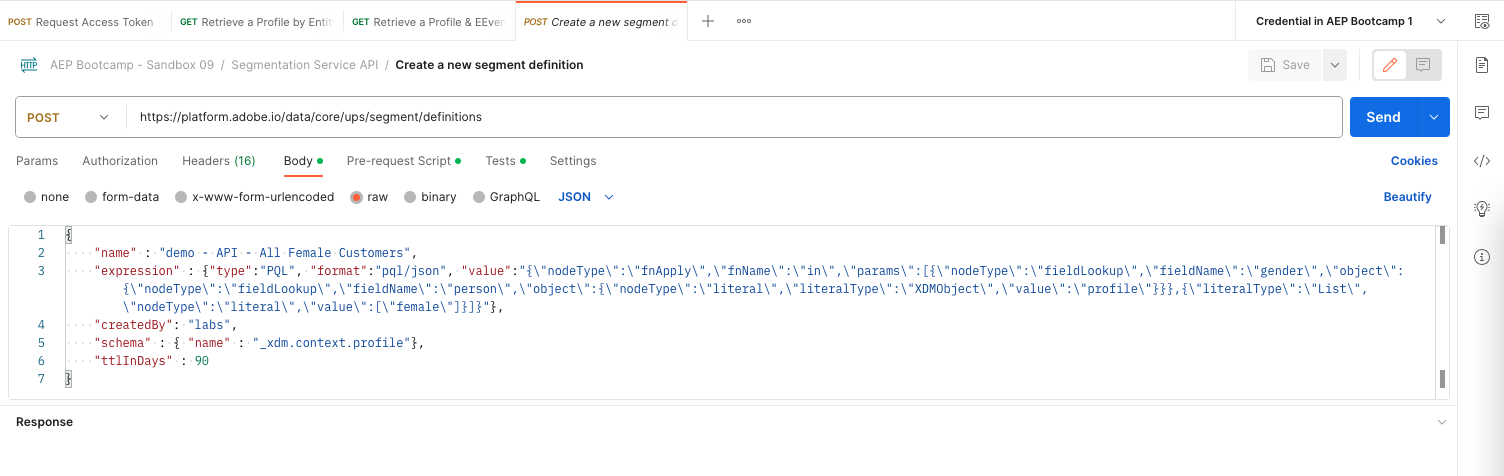
- Update the name value within the Body request. E.g. replace demo with your user identification.
- The body should look like:
{
    "name" : "sacker - API - All Female Customers",
    "expression" : {"type":"PQL", "format":"pql/json", "value":"{\"nodeType\":\"fnApply\",\"fnName\":\"in\",\"params\":[{\"nodeType\":\"fieldLookup\",\"fieldName\":\"gender\",\"object\":{\"nodeType\":\"fieldLookup\",\"fieldName\":\"person\",\"object\":{\"nodeType\":\"literal\",\"literalType\":\"XDMObject\",\"value\":\"profile\"}}},{\"literalType\":\"List\",\"nodeType\":\"literal\",\"value\":[\"female\"]}]}"},
    "createdBy": "labs",
    "schema" : { "name" : "_xdm.context.profile"},
    "ttlInDays" : 90
}
You should also verify the Headers of your request.
- Select Headers tab.
- You will see same set of header key/value pairs as in the earlier Postman example requests.
- No action required.
To create the segment:
- Click on Send.
- View the results in the Body section at the bottom.
You can now also view your segment definition in the UI.
- Login to Adobe Experience Platform.
- Go to Audiences.
- Select Browse tab.
You should see your created segment in the list of Audiences.
You have now successfully created a segment using the Adobe Experience Platform APIs.