Create the early renewal journey
est completion: 10 min
Objectives
By the end of this exercise you will be able to:
- Create an audience with a prompt
- Leverage Coworker to create a journey from scratch in a matter of minutes.
- Enforce Admiral's Do's and Don't from the Business Context
- Augment the pace and quality of your journey creation processes when guided by Coworker.
Scenario
Encouraging early renewal is a critical aspect of the Admiral's business. As a result the Admiral early renewal campaign is constantly evolving to identify what works and what doesn't. Therefore new versions of this campaign need to be created on a regular basis. And this time it will take into consideration the learning gathered from the previous exercise. This time it has been discussed that the early renewal campaign will not systematically include an Amazon voucher but instead educate the customers about the yearly price increase and the benefits of renewing early. Admiral marketing team is keen on running an A/B test of both content to analyse the performances of each content and automatically switch on the the winning variant. Therefore the first content will embed an experience decision.
Your task: ask Coworker to create the corresponding journey and let it guide you from the defining the target, to setting up the content.
Prompt sequence
- It is possible to create an audience through Coworker by simply explaining which profile criteria you want to have in it. Let's create an audience that contains the profiles that have received the Moment that Matters #1 and #2 (the ones that backfired). In this case Coworker will guide you through the creation of the correct definition, from Step 1 (search for reusable audiences), Step 2 (Field discovery), Step 3 (Definition building), Step 4 (Size estimation) and Step 5 (creation). Always follow Coworker's advice and respond yes/validate when required, and ignore the various data warnings.
- The final step is to request the journey creation with a final prompt. Stay in the same chat window. As Coworker process the prompt, make sure you approve and validate its inputs. When prompted to save this journey to AJO, simply reply yes (or yes, please).
Note that this prompt includes no business context or logic because Coworker is already aware of it. Instead this prompt focuses on:
- Audience: leverage the audience created in the first section of the use case.
- Decision: request an A/B test for the first email.
- Reminder: request a reminder email.
- Content: request a specific content template and provide few words about each email variants.
Keep in mind that the outputs from a same prompt may differ and you may have different visuals than the screenshots in this guide.
At the end of the creation process you will be prompted this summary message with:
- A link to the journey
- Clear next steps to perform in the journey before publishing
- Email content to upload in the email actions of the journey. You can open the links to see how Coworker put together each content using the Admiral content template.
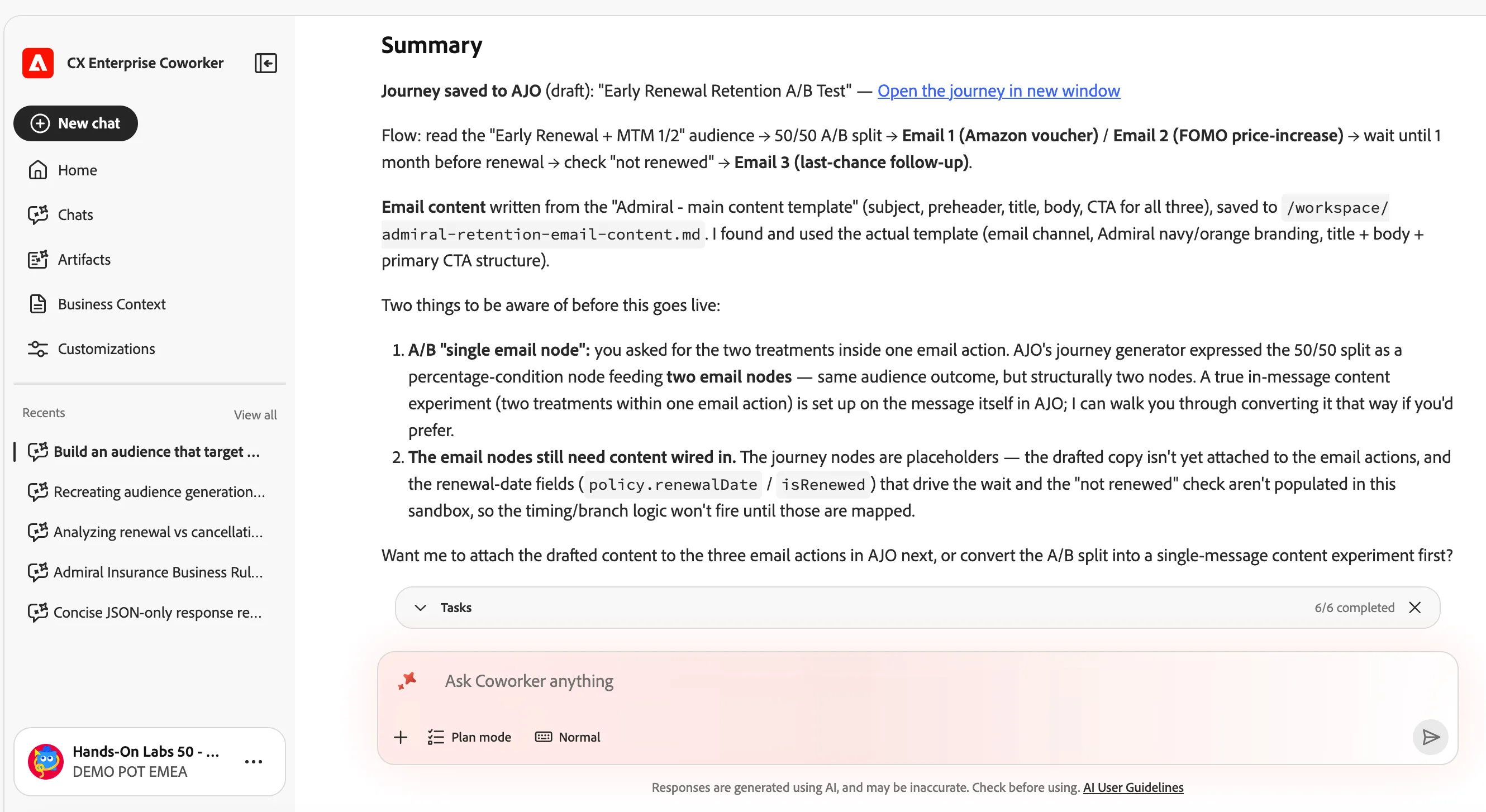
Finally, click on the link to access the Retention journey and see how the journey has been pieced together by Coworker.

Exercise 3 - Complete
You don't need to finish the configuration of the journey as part of this exercise.