[Optional] Customer AI Model
Configuring a "Propensity to Upsell" Model with Adobe Customer AI
What is Customer AI?
Customer AI is part of Adove Experience Platform's Intelligent Services. It uses machine learning to generate individual propensity scores for each customer - predicting how likely someone is to take a specific action, like churning, converting, or in this case, purchasing an upsell.
Why Use Customer AI for Upsell Propensity?
Understanding which customers are likely to upgrade or purchase more allows your marketing teams to:
- Target high-potential customers with tailored messaging.
- Optimize campaigns with better ROI.
- Focus resources where they'll have the most impact.
With Customer AI, these insights are delivered automatically and are updated continuously as your data evolves.
Exercise Overview
In this exercies, you'll configure a Customer AI Model to predict the "Propensity to upsell". This model will score each customer profile in your dataset with a likelihood score between 0 and 1 (higher means more likely to upsell).
All underlying customer data (events, attributes, purchases) has already been ingested and mapped to the Adobe Experience Platform schema.
To log into the Adobe Experience Platform, check the Welcome! section.
- In the left rail, click on Data Science and choose Services.
- On the Services overview page, click Open on the Customer AI product card.
Create a new Model
- Click Create Instance.
- Enter a name for your model - E.g.[Your Name]_Upsell Propensity Model.
- Optionally, add a description: "Scores each customer profile by likelihood to make an upsell purchase within 30 days".
- Choose Conversion as the Propensity Type from the drop down options.
- Click Save and continue.
Select the Data
- Select your Target Dataset - this is the dataset where the upsell event is recorded.
- Select the following datasets from the list:
- Website Events: Demo System - Event Dataset for Website (Global v1.1)
- Mobile App Events: Demo System - Event Dataset for Mobile App (Global v1.1)
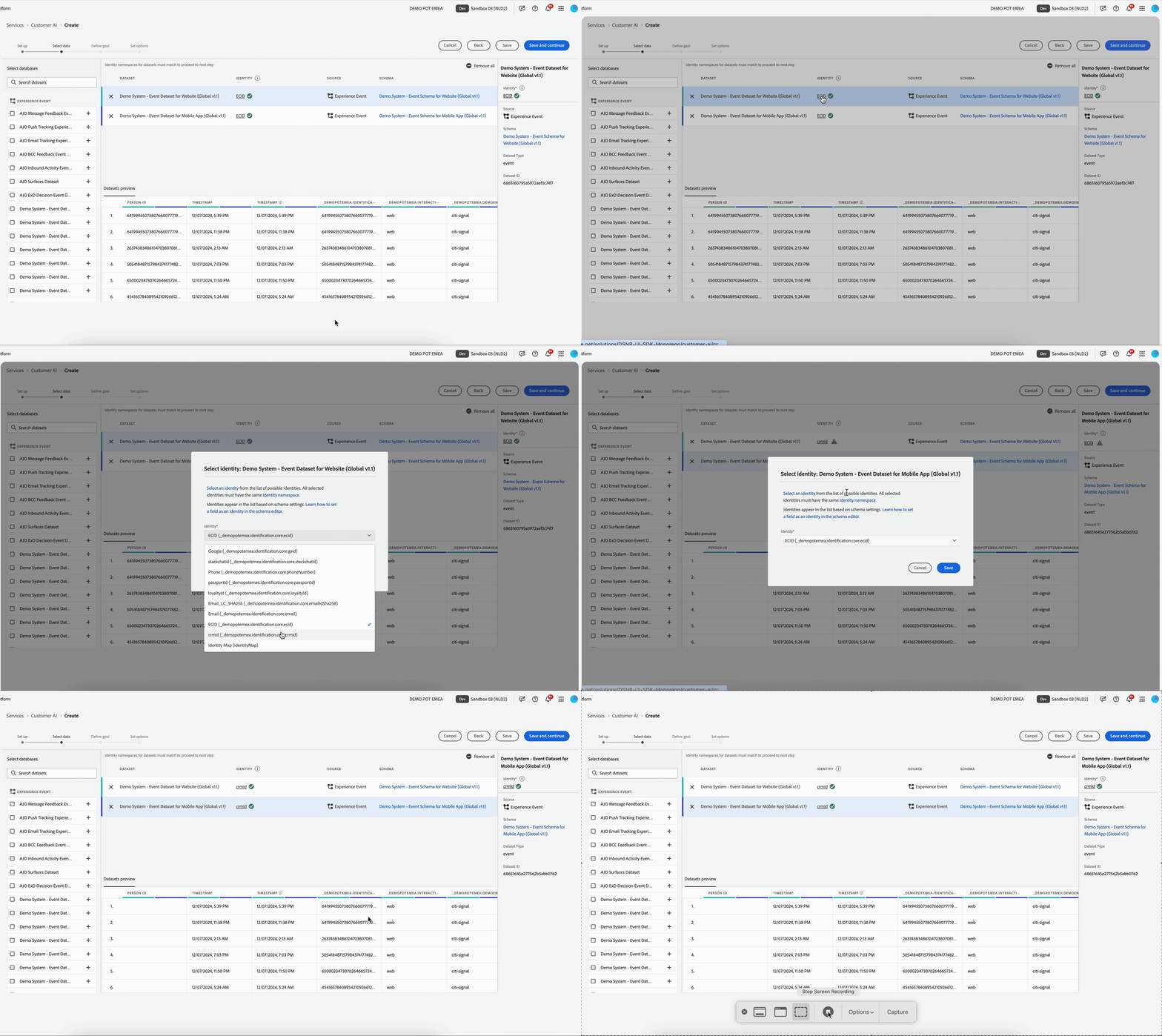
- You can join multiple datasets to one another based on the identity map (field). You must select an identity type (also known as an “identity namespace”) and an identity value within that namespace. In out example we'll use the CRM ID, present in both datasets.
- Click the Identity (ECID) of the first dataset, a popup will open.
- Select crmId (_demopotemea.identification.core.crmId) from the Identity drop down.
- Click Save.
- Repeat for your second dataset to ensure the identities of both datasets match.
Click Save and continue.
Define the Goal
We will define the outcome event, in our case an event that represents an upsell (e.g. "Product Purchase" where interactionType = upsell).
- In the Define your Goal drop down, select Combined Datasets.
- In the same box, type eventType, and select this from the dropdown options.
- Set the eventType value to equals commerce.purchases
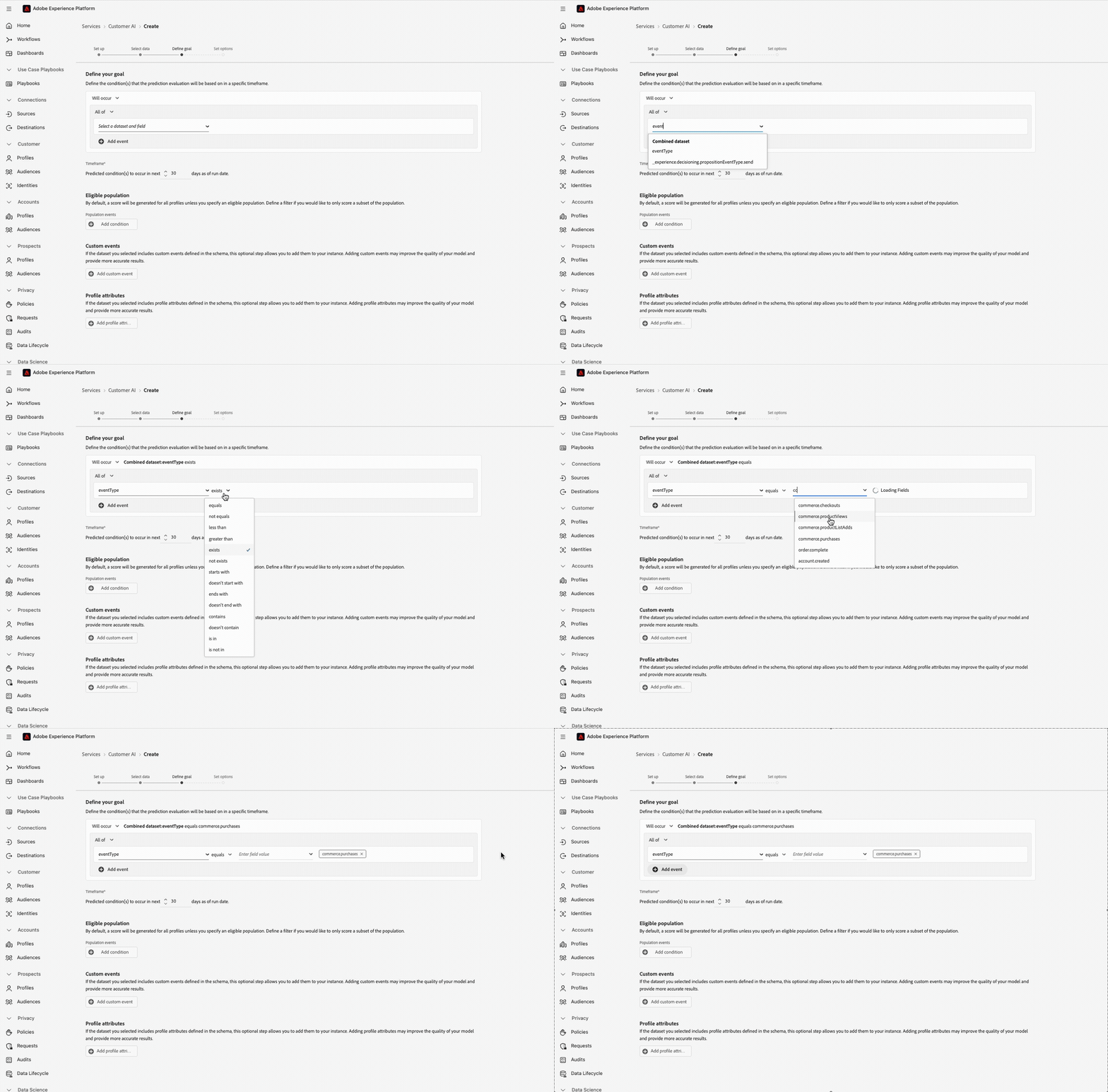
Our Goal now represents a Purchase Event. This is all purchase events, so we need to refine this further to represent only those purchase events where the customer has been upsold.
To only include the purchases that are part of an upsell in the model:
- Select +Add event from underneath your first condition.
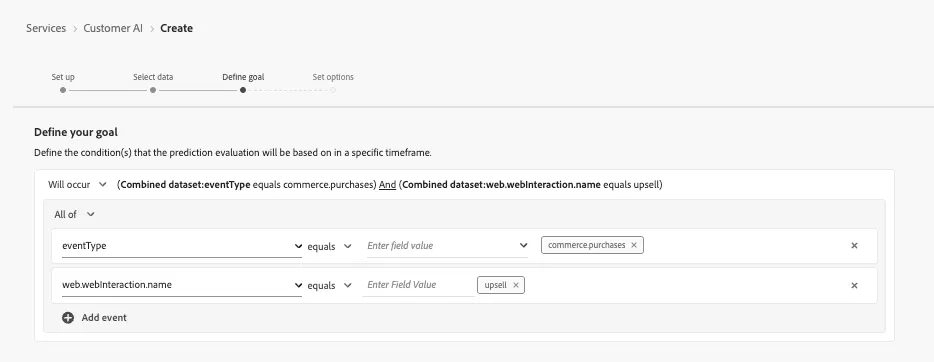
- In the new dropdown, type web.webInteraction.name, and select this from the dropdown options.
- Set the web.webInteraction.name value to equals upsell
Your final goal condition should look like:
Leave the Default setting for the rest of the options on the Define Goal step.
For information only:
- The Timeframe, e.g. 30 days, is how far into the future the model will predict.
- By default, propensity scores are generated for all profiles unless an eligible population is specified. You can specify an eligible population by defining conditions to include or exclude profiles based on events.
- This If you have additional information in addition to the standard event fields used by Customer AI to generate propensity scores, a custom events option is provided. Using this option allows you add additional events that you deem influential which may improve the quality of your model and help to provide more accurate results
- You can define important Profile dataset fields (with timestamps) in your data in addition to the standard event fields used by Customer AI to generate propensity scores. Using this option allows you to add additional profile attributes that you deem influential which may improve the quality of your model and provide more accurate results
For more information about how to improve the accuracy of Customer AI models, visit the Adobe Experience League.
Set Options (Train the Model)
- Review the options screen.
- Schdule your model scoring frequency to run as close to the current time as possible
- i.e. Choose a time in the drop down of 5 minues from now.
- Once complete, you’ll see model performance metrics (e.g., accuracy, precision).
- Training may take up to a few hours depending on data volume.
Do not click Finish here, instead you can Save and exit.
Since the model will take time to generate results, we will use the output from a model created earlier in the next step.
Review & Activate Scores
- Navigate back to the Services Overview page. On the Services overview page, click Open on the Customer AI product card.
- You'll see 2 previously created Service Instances.
- Click the Propensity for Upsell Model.
You'll see the following:
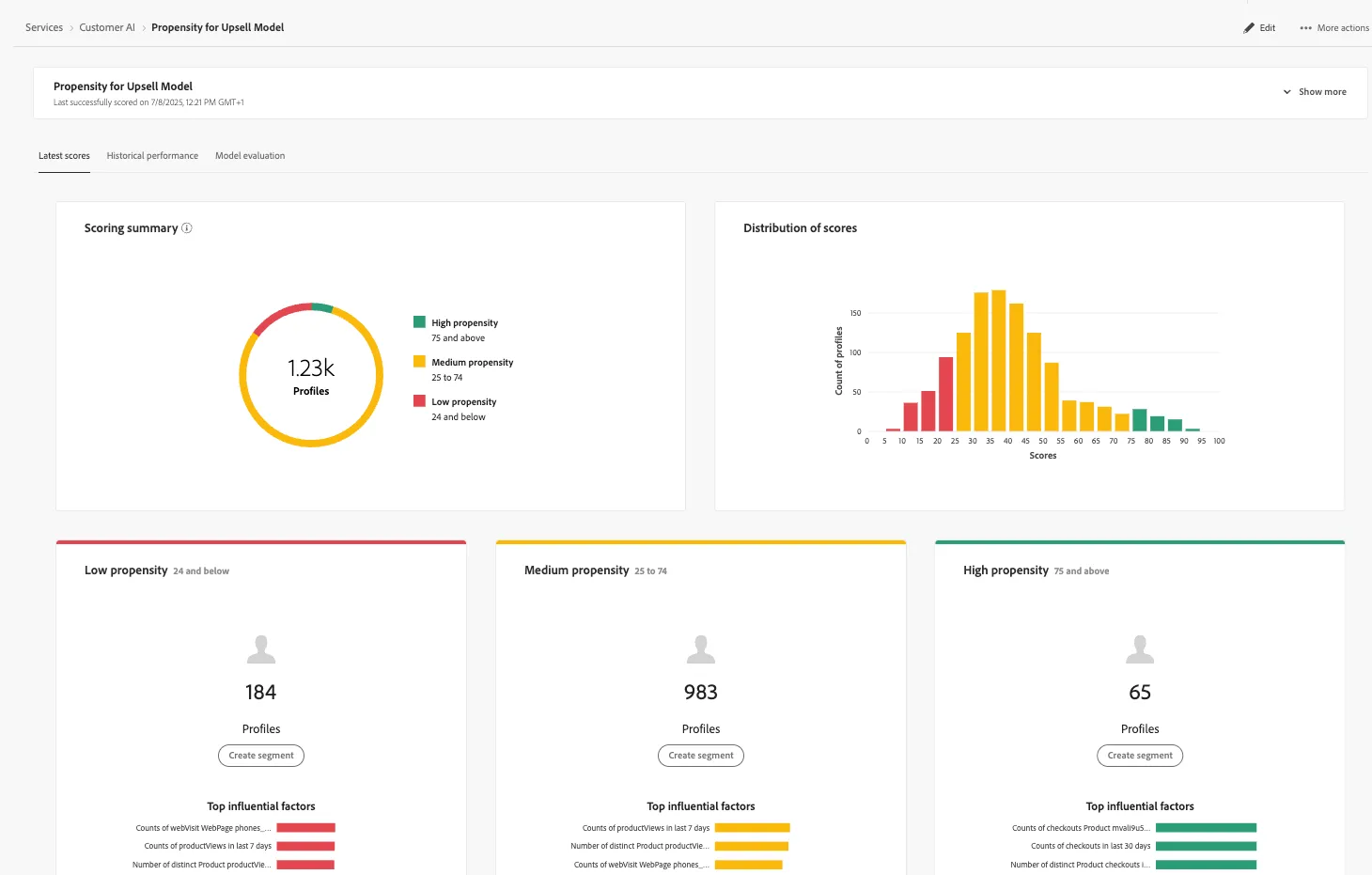
This model was set up ahead of the Lab, to show the output of our Customer AI model.
- The Performance Summary tab shows the actual conversion rates for each propensity bucket.
- Scoring summary displays the total number of profiles scored and categorizes them into buckets containing high, medium, and low propensity. The propensity buckets are determined based on score range, low is less than 24, medium is 25 to 74, and high is above 74. Each bucket has a color corresponding to the legend.
- The Distribution of Scores card gives you a visual summary of the population based on the score. The colors that you see in the Distribution of Scores card represent the type of propensity score generated. Hovering over any of the scoring distributions provides the exact count belonging to that distribution.
- For each score bucket, a card is generated that shows the top 10 influential factors for that bucket. The influential factors give you additional details on why your customers belong to various score buckets.
- Hovering over any of the top influential factors further breaks down the data. You are provided an overview as to why certain profiles belong to a propensity bucket. Depending on the factor, you may be given number, categorical, or boolean values. The example below displays categorical values by region.
Scores are written back to each profile in Real-Time Customer Profile, and can now be used for:
- Segment creation (e.g., "High Propensity to Upsell")
- Activation to destinations (e.g., email, ads)
Create an Audience of High Propensity Profiles
Now that your model is trained and scores are available on customer profiles, let's create an Audience of customers with e high likelihood to purchase an upsell product.
- In the left rail, click on Customers and choose Audiences.
- Select + Create Audience
- Choose Build Rule
- Click Create.
- Name your audience: [Your name] - High propensity for upsell.
- Ensure you are on the Attributes tab in the Fields section.
- In the text search field, type CustomerAI. Click into the CustomerAI folder to see the models.
- Select the model we've just configured for Upsell propensity, Propensity for Upsell Model.
- You'll see a Score attribute. Drag the Score attribute onto the canvas where it says Start Building.
- Set the condition to:
- Score is greater than or equal to 0.8
- Click Publish.
Your final Audience definition should look like:
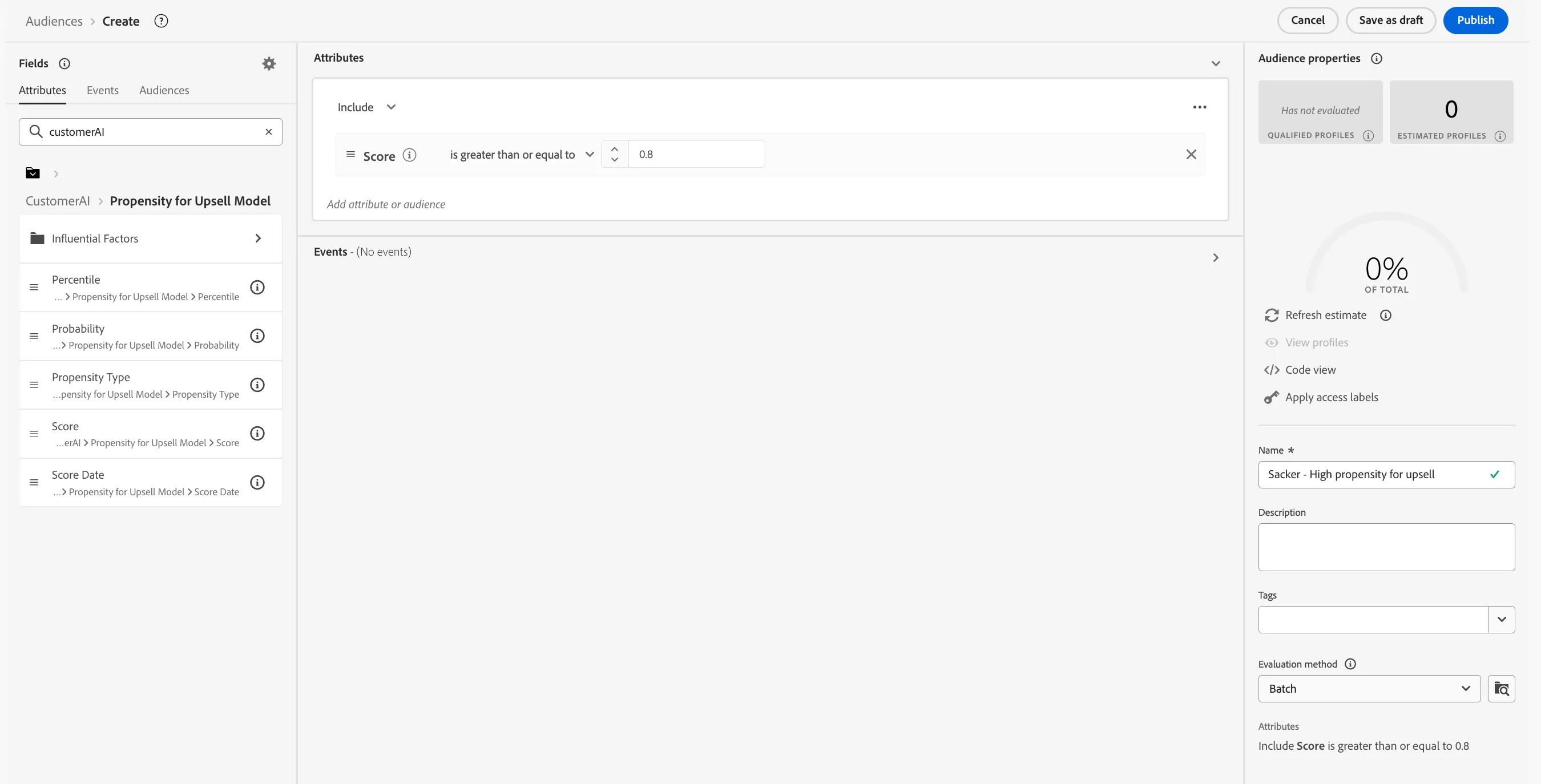
Once the audience is evaluated, it's ready to be activated to Destinations, used in Adobe Journey Optimizer, or monitored for ongoing performance.
Success! By the end of this exercise, you should now:
- Have a trained and active Customer AI model for upsell prediction.
- See scores available on individual profiles.
- Be able to use scores to build Audiences for targeted marketing
For more information on the AI Model used in this example, visit the Adobe Experience League.