6. Advanced features
Narrative context
The email is intelligent. Now we make it learn. Two subject-line variants will compete head-to-head on the NTB welcome email (the first message new prospects receive); the platform will send the recap email at the moment most likely to drive an open for each individual recipient; and before any of it goes live, AJO Brands will score the result against the LF Group brand profile and tell us whether the voice is right.
Configure content experimentation
- On the canvas, click the Welcome email action node.
- In the right panel, click Configure action.
- Click Create experiment.
- Set the Success metric to Email opens.
- Scroll down and click Add treatment.
- Rename the two variants:
- Treatment A > Personalised subject line.
- Treatment B > NON Personalised subject line.
- Select Auto scale.
- Click Create.
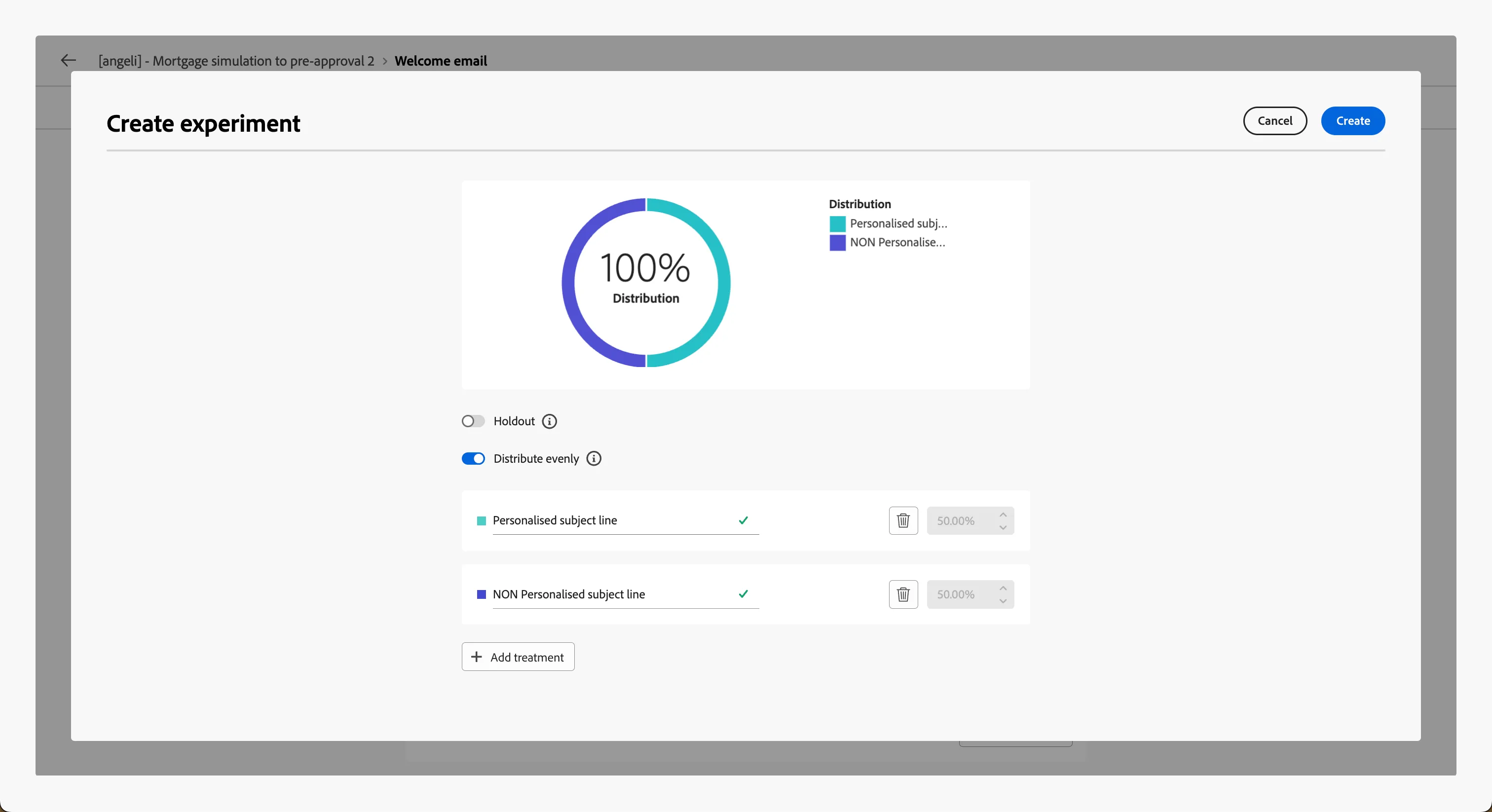
- Click Edit Content. On left you can now see two variants, where you can make the required modification. Leave the subject line of the variant Personalised subject line as it is.
- Click on NON Personalised subject line
- Click Content Template > Apply content template.
- Select LF - Mortgage simulation recap and click Confirm.
- Click the icon
 beside the Subject line.
- Replace the text with this:
{{datasetLookup datasetId="6a057cfbc3a72bed311f35e8" id=profile._demopotemea.lf.companyId result="company" required=false}}
Welcome to {{company._demopotemea.displayNames.short}}.
As you can see, it does not contain the personalisation token {{profile.person.name.firstName}} anymore.
- Click Save.
- Click the arrow on the top left corner to go back to the canvas.
- Click Save.
Now you have two variants with the same content, but different subject line.
Enable send-time optimization
Different recipients open email at different times. Rather than sending the recap to everyone at noon, the platform learns each recipient's typical open window and schedules per-profile. We apply Send time optimization to the email — the high-value moment of the journey — where send timing matters most.
- Click on the Follow up email node, then Configure action.
- Toggle Send-time optimization.
- Toggle Send time optimization to On.
- Set the Optimization send time to Opens.
- Set the Send window to within next 6 hours.
- Click Save.
STO is powered by AJO's Journey AI service. It uses each recipient's historical open behaviour on the LF sender domain to choose the time.
- Click the arrow on the top left corner to go back to the canvas.
- Click Save.
Review the email against AJO Brands
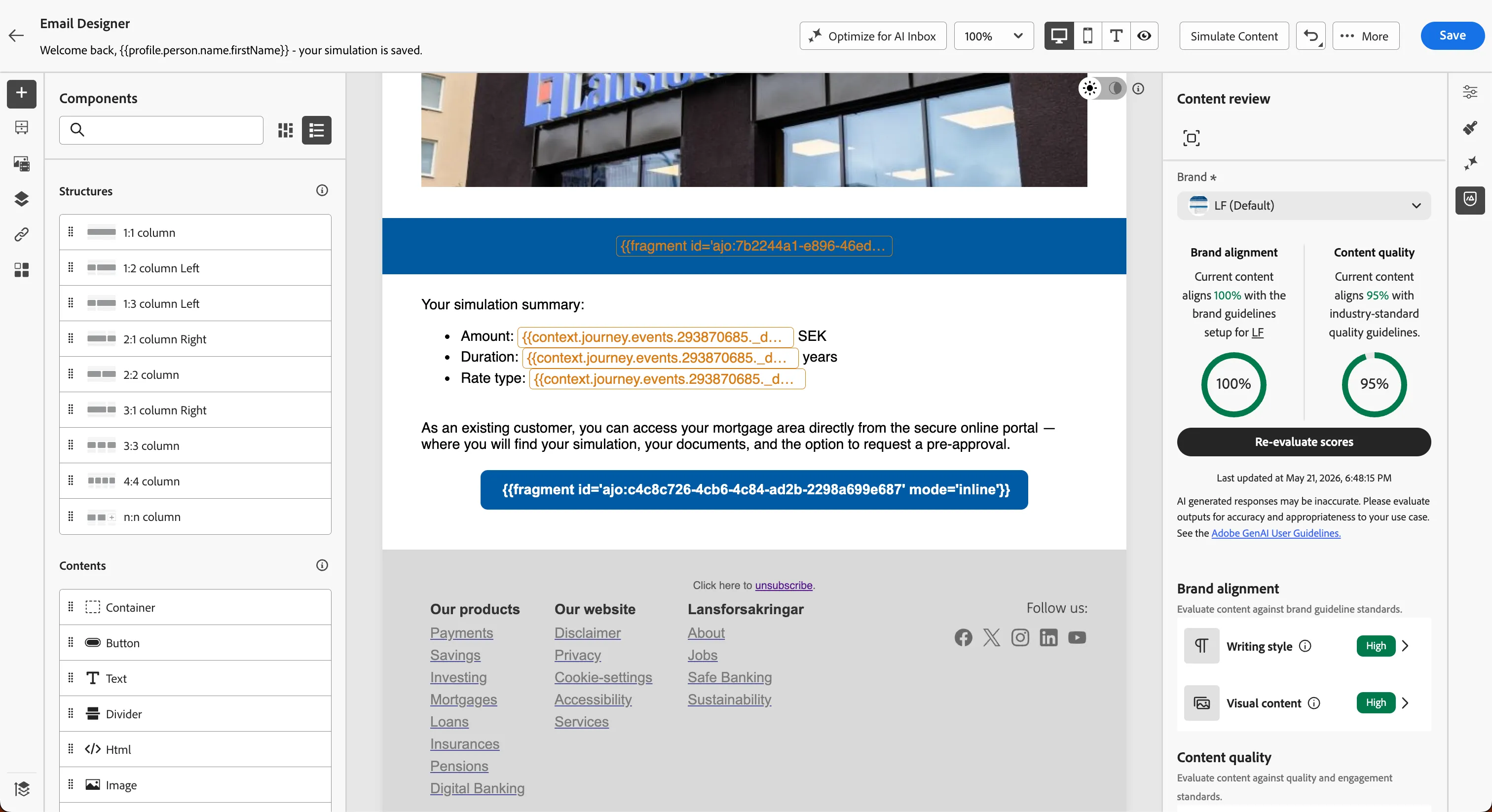
Before activating the journey, run a brand-alignment check. AJO Brands compares the email's voice, palette, and structure to the LF Group brand profile and produces an alignment score plus specific suggestions.
- Click on Edit content, then Edit email body.
- In the right panel, click Brands icon
 .
.
- Click Evaluate scores.
Wait for the score (typically 5-10 seconds).
You should see:
- Brand alignment: typically 82-90% on a well-configured template
- Content quality: typically 82-90% on a well-configured template
Below the overall score, you can check each specific area evaluated by AI and get suggestion on how to improve it.
Brands does not auto-correct — it advises. The marketer remains the editor. The value is in catching drift before send, not in homogenising every email.
Business punchline
You have turned a single email into a system that improves itself on three different axes at once. The subject line that lands better will surface in the report. The time each customer is most likely to open is chosen automatically, per person. And the voice of the email is checked against the brand before it leaves — not after a customer complaint surfaces in a focus group. The marketing team will know which subject won within a week and can edit the email to scale onto it; the rest happens silently, every send.