Sharing Filters from CJA to CDP
Objectives
- Understand the difference between a segment and an audience in Customer Journey Analytics
- Publish a CJA segment to Adobe Experience Platform
- Verify that the published audience is available for activation in Real-Time CDP
In Customer Journey Analytics, a segment is a set of rules applied to your data to produce a filtered subset for analysis purposes — it lives entirely within CJA. An audience is what that segment becomes once you publish it: a concrete list of real customer identities, ready to be transported to Adobe Experience Platform and activated through Real-Time CDP. Publishing is what bridges analysis and action.
Create audience
- From the top level menu click on Components > Published audiences.
- Click on Create Audience.
- from the dropdown select the right data view: Hol Retail - Production /1 (dv) .
- in the left rail menu, search for the Cross-channel sessions (Retail) filter (or the one with your name);
- drag and drop the filter in the Segment section, at the bottom of the screen.
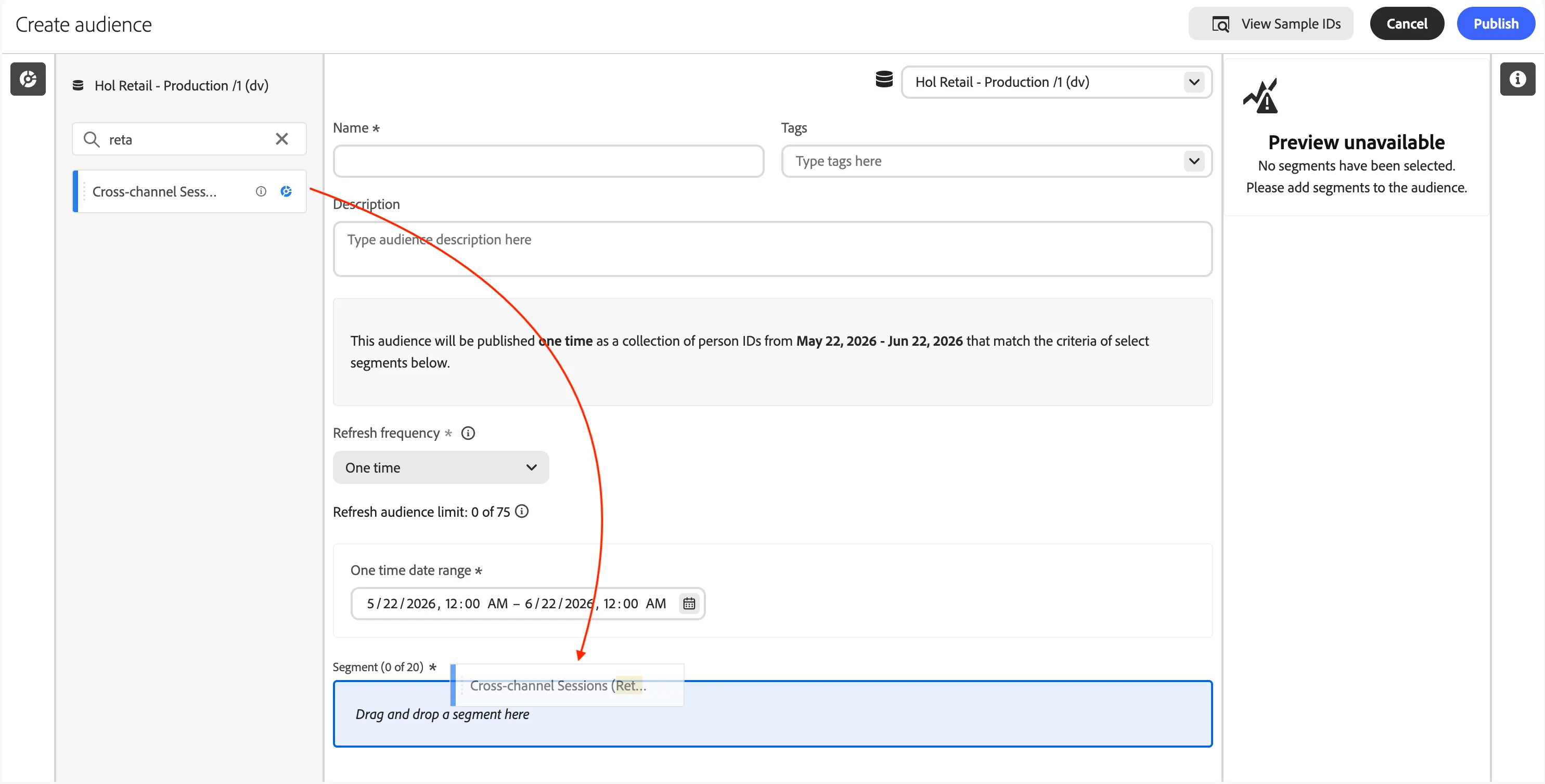
- in the Name text box type [{{LASTNAME}}] - Shared filter;
- leave the rest as it is, click on Publish.
- Click View in Experience Platform within the confirmation message and you will be taken to the Segment UI in Adobe Experience Platform.
What happens after an audience is created?
After you have created an audience, Adobe creates an Experience Platform streaming segment for each new CJA audience. An AEP streaming segment will only be created if your organization is set up for streaming segmentation.
- The AEP segment shares the same name/description as the CJA audience, but the name will be appended with the CJA audience ID to ensure that it is unique.
- If the CJA audience name/description changes, the AEP segment name/description reflects that change as well.
- If a CJA audience is deleted by a user, the AEP segment is NOT deleted. The reason is that the CJA audience may later get undeleted.
Use CJA audiences in Experience Platform
CJA takes all the namespace and ID combinations from your published audience and streams them into Real-time Customer Profile (RTCP). CJA sends the audience over to Experience Platform with the primary identity set, according to what was selected as the Person ID when the connection was configured.
RTCP then examines each namespace/ID combination and looks for a profile that it may be part of. A profile is basically a cluster of linked namespaces, IDs and devices. If it finds a profile, it will add the namespace and ID to the other IDs in this profile as a segment membership attribute. Now, for example, “[email protected]” can be targeted across all their devices and channels. If a profile is not found, a new one is created.
Recap
Well done! With the Research section you have explored how Customer Journey Analytics turns raw behavioural data into actionable insights:
- Analysis projects to combine dimensions, metrics and visualisations across online and offline channels.
- Attribution models to measure the real impact of marketing touchpoints on conversions and call-centre deflection.
- Audiences shared from CJA to Real-Time CDP to act on the insights through targeted activation.
In this section you stepped out of the customer's shoes and into the analyst's. You investigated post-purchase behaviour around in-store pickup, compared repeat purchase patterns across fulfilment types, and uncovered an untapped engagement opportunity. With these findings in hand, it's time to act: the next section, Engage, turns the pickup moment into a commercial touchpoint.