Sharing Filters from CJA to CDP
Goals
- Publish a CJA segment to Adobe Experience Platform's Real-time Customer Profile.
- Build and publish an audience of confirmed travellers who haven't yet purchased online ancillary offers.
Cross-channel audience
Scenario: The analysis so far has identified a pattern: a significant share of WKND customers interact across digital and call centre channels. The customer experience team wants to engage these customer proactively, before they call.
Task: Publish the cross-channel segment as an Audience.
To create audiences from CJA, you have three options:
Creation method | Details |
|---|---|
From the main menu: Components > Published Audiences | Opens the Audience builder directly |
From a Freeform table | Right-click an item and select Create an audience from selection |
From the Segment builder UI | Click Create audience from segment |
Use the first approach:
- From the main menu, click Components > Published Audiences.
- Click Create audience.
- Name your audience: {{LASTNAME}} - Cross-channel Sessions.
- Select the data view: {{ENV:CJA_DATA_VIEW}}
- In the left rail, search for the Cross-channel sessions segment (or the one with your name).
- Drag and drop the Segment in the definition section.
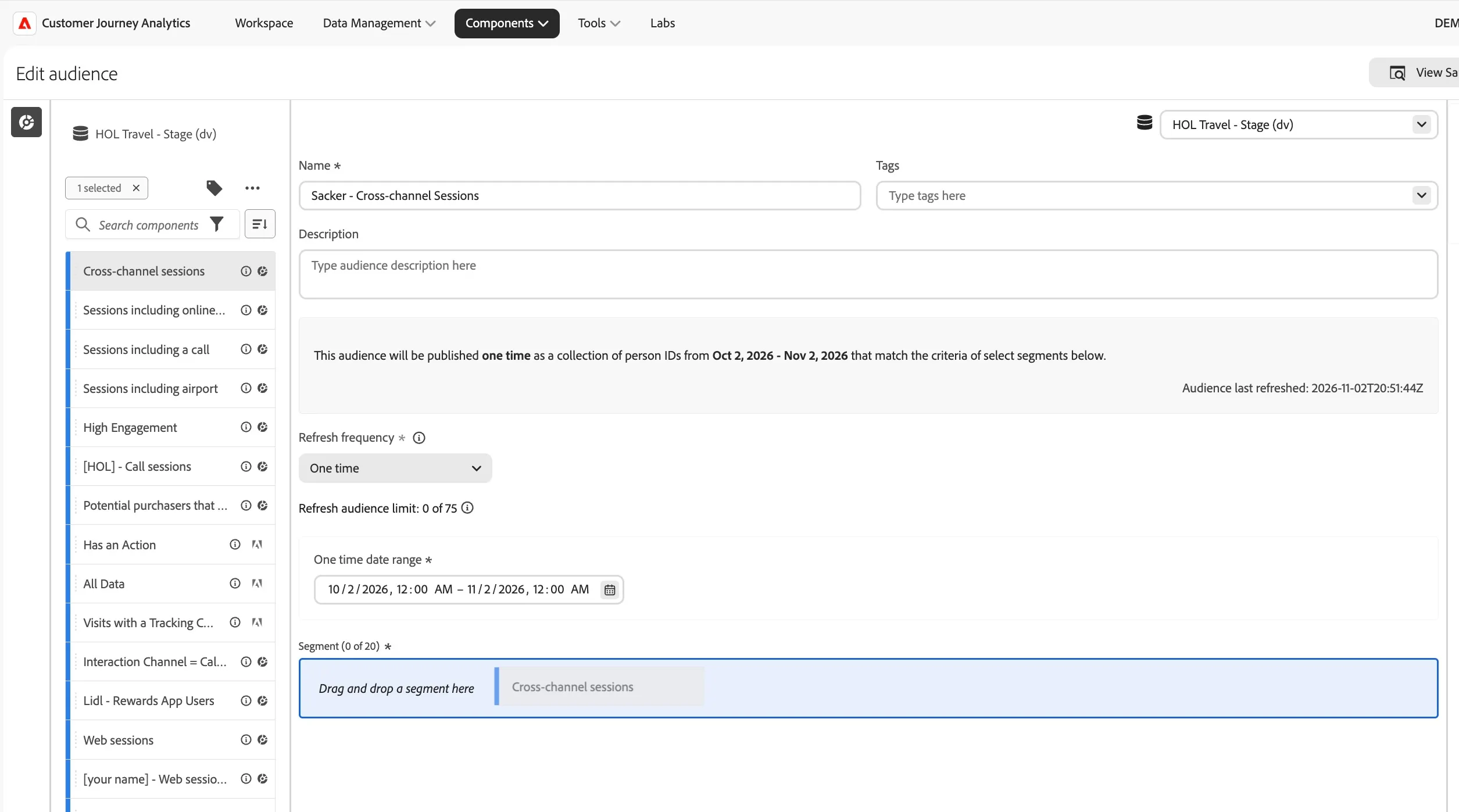
- Click Publish.
- Click View in Experience Platform within the confirmation message.
The published audience will appear in the AEP Audiences inventory, ready to activate to any connected destination - email, push, paid media or for real-time personalisation on the website.
What happens after an audience is created?
After you publish an audience, Adobe creates an Experience Platform streaming segment. The AEP segment shares the same name and description as the CJA audience, with the CJA audience ID appended to ensure uniqueness.
CJA sends the audience to Experience Platform with the primary identity set according to the Person ID configured in the connection - in this case, Email. RTCDP then matches each identity to a profile, adds the segment membership attribute, and makes the audience available for activation across all connected channels and devices.
You can view CJA audiences in Platform by navigating to Audiences > Browse.
Recap
Well done! With the Research section you stepped out of the customer's shoes and into the analyst's seat. Starting from a single operational question, "can the check-in notification email do more than explain a process?" you built a complete analytical case:
- Cross Channel Data revealed that WKND's customers move freely between digital and call centre channels they are the same people, not separate groups.
- Journey Visualisation showed the ancillary purchase split: 40% of bookers buy online at or near booking time, 26% eventually buy at the airport, and 44% buy nothing at all.
- Marketing Performance showed which channels drive bookings, and how algorithmic attribution redistributes credit to the channels that started the journey.
- Call Center Deflection confirmed that check-in assistance is the second most common call reason, the same friction that sends passengers to the airport desk rather than the digital channel.
The next section, Engage, turns the 2 week period before their trip into a commercial touchpoint, enriching a notification email with an exclusive offer available only for that pre-trip time period.